Send Crypto From Binance to Safe Wallet: Steps 2026
— By Tony Rabbit in Tutorials
Send crypto from Binance to Safe Wallet safely: a step-by-step 2026 guide covering network matching, test withdrawals, fees, and troubleshooting.
Sending crypto from Binance to Safe Wallet is straightforward when the destination is clear before the withdrawal begins. Most avoidable mistakes happen earlier, when users copy a Safe address too quickly or treat the network selector on Binance like a minor detail instead of the real decision.
This guide is built around the exact search intent users have in 2026: how to send crypto from Binance to Safe Wallet. The safe version of this transfer is not just copy, paste, send. It is preparing Safe first, confirming the correct Safe account and network, then matching the asset, address, and network on Binance as one combined decision.
Quick answer
- Open Safe first, make sure you are looking at the correct Safe account, and confirm the destination network before copying anything.
- On Binance, make sure the asset, address, and network all match the Safe destination you prepared.
- If the amount matters, the Safe is new, or the network is not routine for you, do a small test withdrawal before sending the full size.

Why Users Move Crypto from Binance to Safe Wallet
Binance is useful for buying, selling, and holding balances inside exchange infrastructure. Safe is useful when the user wants stronger self-custody, a smart account structure, and tighter control over how funds are managed after they leave the exchange. That makes this a different kind of exchange-to-wallet move than a simple hot-wallet transfer.
If you need the broader platform walkthrough first, read How to Use Binance in 2026: Complete Beginner Guide. If you need the wallet setup first, read How to Use Safe Wallet: Complete Beginner Tutorial 2026.
Binance to Safe rulebook
Step 1: Prepare Safe Before You Touch the Withdrawal Screen
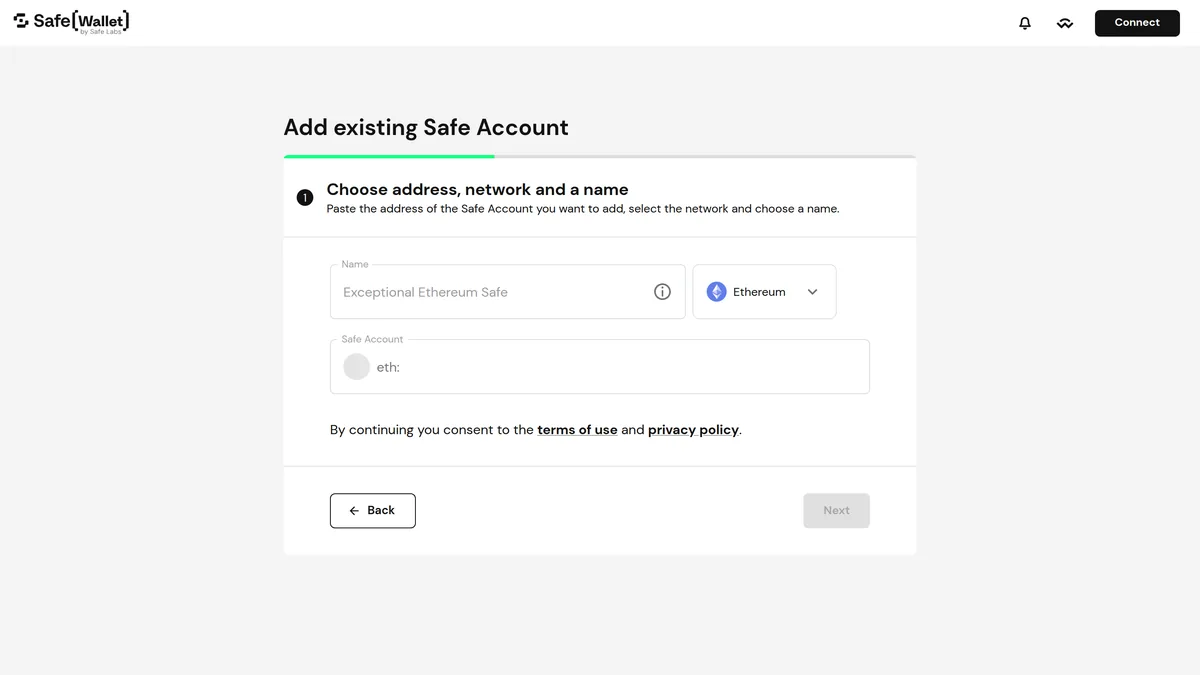
The safest order is wallet first, exchange second. Open Safe, make sure you are looking at the correct Safe account, and confirm the network you actually want to receive on before you touch the withdrawal flow on Binance. If the Safe is new, this is also where you slow down and make sure it is properly deployed on that network before you try to fund it.
Many transfer mistakes feel technical after the fact, but the cause is usually operational. The user copied the right-looking address, forgot which network the Safe was prepared for, or confused the Safe account with the signer wallet used to control it. Slowing down at the Safe stage solves most of that before it turns into a real problem.
Step 2: Copy the Safe Account Address Carefully
After Safe is ready, copy the destination directly from the interface. Do not rely on an old clipboard entry, a screenshot, or a note that happened to work on a different day. Safe transfers fail less from complicated technology than from casual shortcuts that feel harmless in the moment.
The key distinction is simple but important: the address you are funding is the Safe account address, not the signer wallet address you use to approve actions later. For users moving common assets, the temptation is to think only about the address. That is incomplete. The real question is whether the network on Binance matches the network your Safe is actually ready to receive on. The correct address on the wrong network is still the wrong transfer.
Step 3: Configure the Withdrawal on Binance
This is where most avoidable problems happen. On Binance, the address field feels important, but the real decision is the network itself. Asset, address, and network only make sense together. Break that relationship and the user creates confusion immediately.
On Binance, pay extra attention to the final withdrawal review, the exact network selected, and any security prompt around the destination. The interface may feel clean and familiar, but that is exactly why users skim the one detail that matters most.

What to review before confirming on Binance
Step 4: Use a Test Withdrawal for Meaningful Amounts
A small test transfer is still the cleanest risk-management habit in self-custody. If the first small amount lands correctly in Safe, most of the uncertainty disappears before the full balance moves. That matters even more for users who do not withdraw from Binance often, who are funding a newly prepared Safe, or who are moving an asset that exists across more than one network.
Binance to Safe flow
Step 5: Verify the Funds in Safe
After Binance marks the withdrawal as complete, confirm the funds inside Safe before you relax. Start with simple checks: are you in the correct Safe account, are you on the correct network, does the tx hash match what you selected on the exchange, and are you looking for the right asset? Many missing-funds stories are visibility problems or network confusion, not real loss events.
If the transaction confirms and the network details were correct, the next thing to check is the Safe view itself, not panic. In many cases the issue is not loss. It is that the user is looking at the wrong Safe, the wrong network, or the signer wallet instead of the Safe account they actually funded.
Fees, Timing, and Confirmation Expectations
Users searching this keyword do not only want to know whether the transfer works. They also want to know what it costs and how long it should take. The practical answer depends on the live withdrawal fee shown on Binance, the network you choose, and whether extra account security checks slow the request down.
The cheapest network is not always the correct network. If lower cost pushes the user onto a network that does not match the Safe destination they actually intended, the cheap option becomes the expensive one. The goal is not only low cost. It is a correct, low-friction transfer that lands where the user expects.
What users should expect before sending size
Common Binance to Safe Mistakes to Avoid
Mistakes that hurt users over and over
What to Do If the Transfer Does Not Show Up
If Binance says the withdrawal is complete but you do not see the funds in Safe yet, do not jump straight to panic. Confirm the withdrawal status and tx hash on Binance, then verify the exact destination, Safe account, network, and asset inside the Safe interface. If needed, refresh the view and re-check the network before assuming anything was lost.
Most of the time, the answer is boring rather than dramatic: wrong Safe, wrong network assumption, or asset visibility confusion rather than actual loss. That is exactly why a test withdrawal is such a strong habit. It turns a scary unknown into a controlled verification.
Frequently Asked Questions
Can I send ETH or USDC from Binance to Safe Wallet?
Yes, but you need to match the asset and network shown on Binance with the network your Safe is actually ready to receive on. If the Safe is not deployed there yet, slow down before confirming.
How long does it take to send crypto from Binance to Safe Wallet?
It depends on the asset, chain congestion, and any withdrawal review on Binance. Some transfers are quick, but slower does not automatically mean failed.
What if the transfer does not show up in Safe Wallet right away?
Start with the basics: confirm the withdrawal status and tx hash on Binance, then verify the exact Safe account, asset, and network view before assuming the funds are missing.
Should I do a test withdrawal from Binance to Safe Wallet first?
Yes. If the Safe is new, the network is new, or the amount is meaningful, a small test withdrawal is still the safest habit.
What fee should I expect when withdrawing from Binance to Safe Wallet?
The cost depends on the asset and live network shown on the Binance withdrawal screen. Always confirm the exact fee before you send.
Related reading
Disclaimer: This article is for educational purposes only and does not constitute investment, tax, or legal advice. Exchange withdrawal options, supported networks, wallet behavior, and live fees can change over time. Always confirm the live asset, network, and destination details before moving funds.