How to Use Etherscan & Solscan: Block Explorer Guide (2026)
— By Tony Rabbit in Tutorials
Learn how to use Etherscan and Solscan block explorers to track transactions, verify smart contracts, and analyze crypto data like a pro.
Etherscan and Solscan are essential blockchain explorers that function as search engines for their respective networks, Ethereum and Solana. They allow users to transparently track transactions, verify smart contract code, monitor wallet activity, and research tokens by providing public, verifiable data on all on-chain activities. This guide will equip you with the knowledge to navigate these powerful tools and understand the blockchain like a seasoned professional.
What Are Blockchain Explorers?
Blockchain explorers are powerful web-based tools that provide a searchable interface for the data stored on a specific blockchain. Think of them as Google for the blockchain. Every transaction, wallet address, smart contract, and block ever recorded on a public blockchain is accessible and verifiable through these explorers.
They demystify the complex, decentralized ledger by presenting raw on-chain data in an organized, user-friendly format. This transparency is a cornerstone of blockchain technology, ensuring that all activities are publicly auditable.
Key Functions of Blockchain Explorers
These tools offer a wide array of functionalities crucial for anyone interacting with cryptocurrencies and decentralized applications (dApps). Understanding these core functions is the first step to becoming a proficient blockchain user.
- Transaction Tracking: Verify payments, check their status (pending, success, failed), and analyze associated gas fees.
- Wallet Address Monitoring: View any public wallet's balance, transaction history, and token holdings.
- Smart Contract Inspection: Read contract code, check verification status, and interact with contract functions.
- Token Research: Discover total supply, holder distribution, transfer history, and key contract parameters for any token.
- Block Exploration: Dive into individual blocks to see their contents, including transactions, block height, and timestamp.
Etherscan: The Ethereum Explorer
Etherscan is the premier blockchain explorer for the Ethereum network. It provides comprehensive data for Ethereum and all ERC-20 tokens, smart contracts, and decentralized applications built on it. It's an indispensable tool for developers, investors, and everyday users.
How to Track an Ethereum Transaction on Etherscan
Tracking a transaction is one of the most common uses for Etherscan. It allows you to confirm if a transfer was successful, identify delays, or troubleshoot issues.
- Navigate to Etherscan.io. Open your web browser and go to the official Etherscan website.
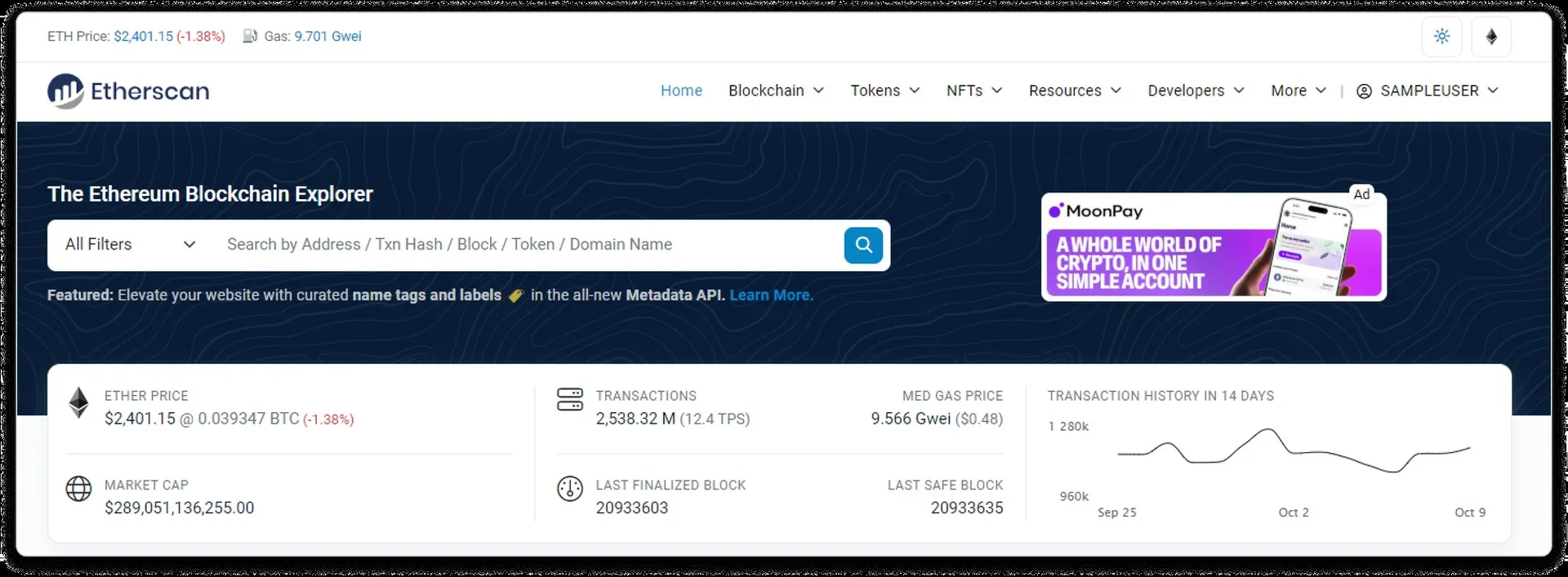
- Paste the Transaction Hash (TxHash). Locate the search bar at the top of the page. This is where you will input the unique identifier for your transaction.
- View Transaction Details. After pasting the TxHash and pressing Enter, you will see a detailed page. Key information includes:
- Status: Indicates if the transaction was 'Success', 'Failed', or 'Pending'. A 'Failed' status means the transaction reverted, but you still pay gas fees.
- From/To Addresses: The sender and recipient wallet addresses.
- Value: The amount of ETH or tokens transferred.
- Gas Fee: The cost paid to execute the transaction on the network.
- Timestamp: When the transaction was processed.
How to Check an Ethereum Wallet Address
Monitoring a wallet address can provide insights into balances, historical activity, and token holdings, useful for tracking personal funds or public whale wallets.
- Go to Etherscan.io.
- Paste the Ethereum Wallet Address. Enter the 0x... address into the search bar.
- Review Wallet Overview. The page will display the current ETH balance and a summary of recent transactions.
- Explore Token Holdings. Click on the 'Token Holdings' tab to see all ERC-20 tokens held by the wallet, along with their quantities and values.
- Analyze Token Transfers. The 'Token Transfers' tab shows all incoming and outgoing token movements, providing a granular view of asset flow.
How to Verify an Ethereum Smart Contract
Verifying a smart contract is critical for security and trust. It allows users to confirm that the deployed bytecode matches the publicly provided source code.
- Search for the Token or Contract Address. Use the Etherscan search bar to find the specific contract you want to inspect.
- Navigate to the 'Contract' Tab. On the contract's overview page, locate and click this tab.
- Look for the Green Checkmark. A prominent green checkmark next to 'Contract Source Code Verified' indicates that the code has been verified. This means the developers have published the source code, and Etherscan has confirmed it compiles to the deployed bytecode.
- Review Contract Functions. Click 'Read Contract' to view public functions and variables (e.g., owner, total supply, token name). The 'Write Contract' tab allows you to interact with the contract directly (e.g., approve tokens, transfer ownership), usually requiring a connected web3 wallet.
Solscan: The Solana Explorer
Solscan serves as the primary blockchain explorer for the Solana network, known for its high throughput and low transaction fees. It provides a similar range of functionalities to Etherscan but tailored to Solana's unique architecture.
How to Track a Solana Transaction on Solscan
Solana transactions are structured differently from Ethereum's, often containing multiple 'instructions' within a single transaction signature.
- Go to Solscan.io. Access the official Solscan website.
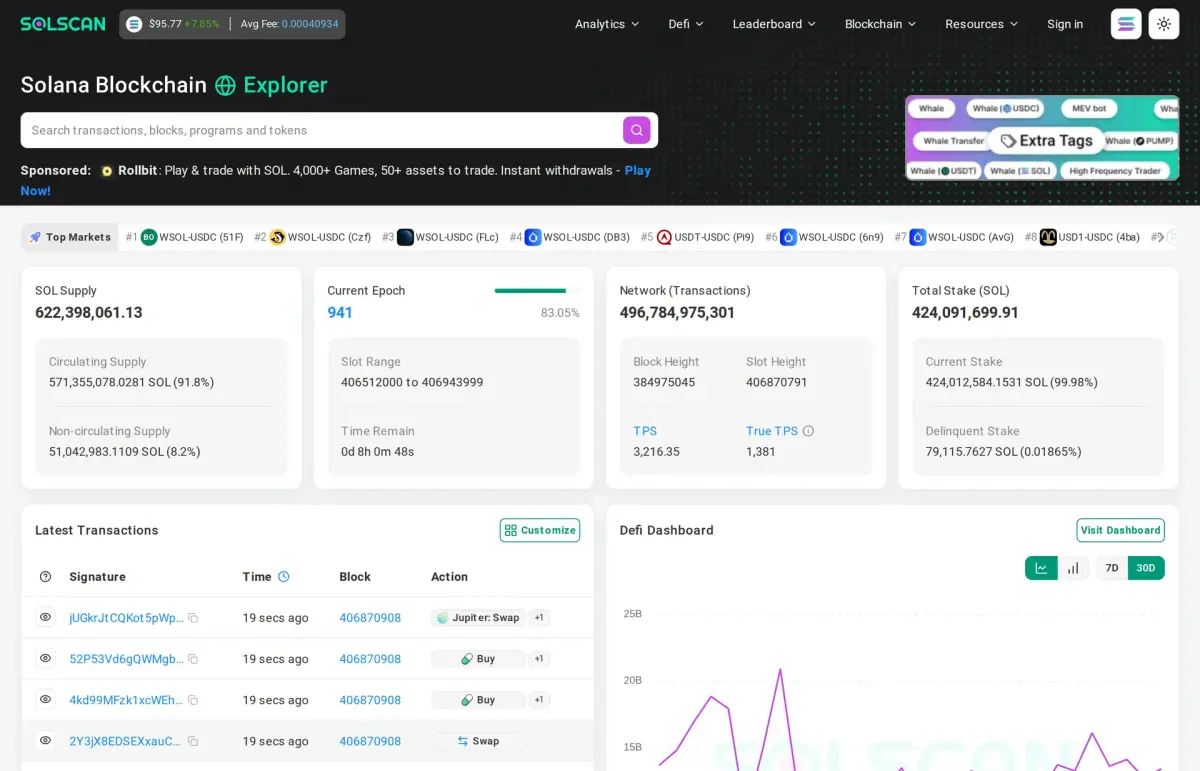
- Paste the Transaction Signature. Enter the unique transaction signature (a long string of characters) into the search bar.
- View Transaction Details. The results page will show:
- Status: 'Success' or 'Failed'.
- Instructions: A list of actions executed within the transaction, which can include token transfers, program interactions, or NFT mints.
- Fee: The cost paid in SOL for the transaction.
- Timestamp: When the transaction was confirmed.
How to Research a Solana Token
Understanding a Solana token's parameters is crucial for assessing its safety and potential risks, especially concerning mint and freeze authorities.
- Search for the Token Name or Mint Address. Use the Solscan search bar to find the token you're interested in. The mint address is the unique identifier for the token itself.
- Check Token Overview. Review key details like total supply, number of decimals, and current market cap (if available).
- Inspect Mint Authority. This is a critical security check. If the 'Mint Authority' is not revoked, the token creator can mint an unlimited supply of new tokens, potentially devaluing existing ones. A revoked mint authority is generally safer.
- Review Freeze Authority. If the 'Freeze Authority' is active, the token creator has the power to freeze tokens in any wallet, preventing transfers. This is a major security risk for holders. Ideally, this authority should be revoked.
- Analyze Holder Distribution. Similar to Etherscan, review the 'Holders' tab to identify whale concentration, where a few wallets hold a large percentage of the supply.
Comparing Etherscan vs. Solscan
While both serve as blockchain explorers, their underlying networks dictate distinct features and data structures.
Understanding Transaction Statuses
Interpreting transaction statuses correctly is vital for troubleshooting and confirming on-chain actions.
- Success: The transaction was successfully processed and confirmed by the network. The funds or action completed as intended.
- Pending: The transaction has been broadcast to the network but has not yet been included in a block. It's waiting for miners/validators to pick it up. This can happen due to low gas fees or network congestion.
- Failed: The transaction was included in a block but reverted due to an error (e.g., insufficient funds, contract logic error, out of gas). The sender still pays the gas fee, but the intended action did not occur.
- Dropped/Replaced: A transaction that was pending might be 'dropped' if it's replaced by a new transaction with a higher gas fee (nonce replacement) or if it simply expires from the mempool without being picked up.
Advanced Tips for Using Block Explorers
Beyond basic searches, these tips can help you leverage explorers for deeper analysis and security.
- Track Whale Wallets: Identify large holders (whales) of a token and monitor their transactions. This can sometimes signal upcoming price movements or sentiment.
- Monitor Smart Money: Look for wallets that consistently profit from new tokens or DeFi opportunities. Analyzing their activity can provide insights into emerging trends.
- Check for Proxy Contracts (Ethereum): Some contracts are 'proxies,' meaning their logic can be upgraded. Always check if a contract is a proxy and, if so, investigate the implementation contract to understand its true functionality.
- Use the 'Analytics' Section: Both Etherscan and Solscan offer analytics dashboards for network statistics, gas prices, and token metrics.
- Verify Token Decimals: Especially for new tokens, ensure the number of decimals matches expectations to avoid display errors or miscalculations.
How DEXTools Helps with Explorer Research
While Etherscan and Solscan are indispensable for raw data, platforms like DEXTools complement them by providing real-time market data, charting, and advanced analytics in a unified interface. DEXTools aggregates information from various explorers and decentralized exchanges, offering a more holistic view of token performance, liquidity, and sentiment. For instance, when you identify a token on Etherscan or Solscan, you can quickly jump to DEXTools to see its live price chart, liquidity pools, and community sentiment, streamlining your research process and helping you make more informed decisions.
Conclusion
Etherscan and Solscan are indispensable tools for navigating the transparent yet complex world of blockchain. By mastering their functionalities, you gain the ability to verify transactions, scrutinize smart contracts, and conduct thorough research on tokens and wallets. This knowledge empowers you to interact with decentralized finance and the broader crypto ecosystem with greater confidence and security, making you a more informed and capable participant in the digital economy.
Frequently Asked Questions
What is Etherscan?
Etherscan is a block explorer for the Ethereum blockchain. It allows users to search for transactions, blocks, wallet addresses, and other on-chain data.
What is Solscan?
Solscan is a block explorer specifically designed for the Solana blockchain. It provides similar functionalities to Etherscan but for the Solana ecosystem, including transaction details, account balances, and token information.
How do I find a transaction on Etherscan?
To find a transaction on Etherscan, you typically need the transaction hash (Txn Hash). Enter this hash into the search bar at the top of the Etherscan website and press Enter to view the transaction details.
How do I find a wallet address on Solscan?
You can find a wallet address on Solscan by entering the public key of the Solana wallet into the search bar. Solscan will then display the address's balance, transaction history, and associated tokens.
Can I track ERC-20 tokens on Etherscan?
Yes, Etherscan allows you to track ERC-20 tokens. When viewing a wallet address, you can see a list of all ERC-20 tokens held by that address, along with their balances and transaction history.
Can I track SPL tokens on Solscan?
Absolutely. Solscan provides comprehensive tracking for SPL tokens, which are Solana's native token standard. You can view token balances, transfers, and other details associated with SPL tokens for any given address.
What is the gas price on Etherscan?
Etherscan displays real-time gas prices (Gwei) on its homepage, indicating the current cost of transacting on the Ethereum network. This helps users estimate transaction fees for different speeds.
Does Solscan show network fees?
Yes, Solscan shows network fees for Solana transactions. When you view a transaction on Solscan, it will display the exact fee paid in SOL for that specific transaction.