How to Use DEXTools Alerts for Early Trading Moves
— By Whatsertrade in Tutorials

Master DEXTools alerts to catch early crypto trading moves. This guide covers setting price, volume, liquidity, and whale alerts.
How to Use DEXTools Alerts for Early Trading Moves
To set DEXTools alerts, navigate to your desired token pair, click the 'Alerts' icon (bell symbol) on the chart or pair details page, and then configure specific conditions such as price levels, volume changes, liquidity shifts, or large transactions. These real-time notifications, delivered via browser, email, or Telegram, are crucial for identifying potential market movements before they become widely known, giving traders a significant edge in fast-paced decentralized finance (DeFi) markets.
Why DEXTools Alerts Are Essential for On-Chain Trading
In the lightning-fast world of crypto, especially within decentralized finance (DeFi), timing is everything. By the time a token gains widespread attention on social media, the most lucrative early opportunities have often evaporated. Successful traders understand that relying on real-time, on-chain data is paramount to gaining an edge and cutting through market noise.
DEXTools alerts automate the vigilant monitoring required in these dynamic markets. A significant price breakout, a sudden liquidity shift, or a large whale transaction can unfold in minutes. Manual tracking is simply not feasible for consistent, proactive trading. Alerts provide immediate notifications, allowing you to position yourself early and capitalize on emerging trends rather than reacting to stale news.
Understanding the Power of DEXTools Alerts
DEXTools offers a robust alert system designed to keep traders informed about critical market movements. These alerts are not just simple price notifications; they encompass a sophisticated range of on-chain metrics that, when combined, paint a comprehensive picture of potential market shifts. This proactive approach helps traders avoid chasing pumps and instead identify opportunities as they develop.
The key advantage lies in receiving actionable intelligence directly to your preferred device. Whether it's a browser notification, an email, or a Telegram message, DEXTools ensures you're always connected to the pulse of the market, even when you're not actively watching the charts. This capability transforms passive monitoring into active, informed decision-making.
Step-by-Step Guide: Setting Up DEXTools Alerts
Configuring alerts on DEXTools is straightforward, but strategic setup is key to maximizing their effectiveness. Follow these steps to establish a powerful alert system for your trading strategy.
- Step 1: Access DEXTools and Select a Token Pair. Begin by navigating to the DEXTools platform. Use the search bar to find the specific token pair you wish to monitor. Once found, click on the pair to open its detailed chart and data page.
- Step 2: Locate the Alerts Icon. On the token pair's page, typically near the chart or within the pair's information panel, you will find a bell-shaped 'Alerts' icon. Click this icon to open the alert configuration window.
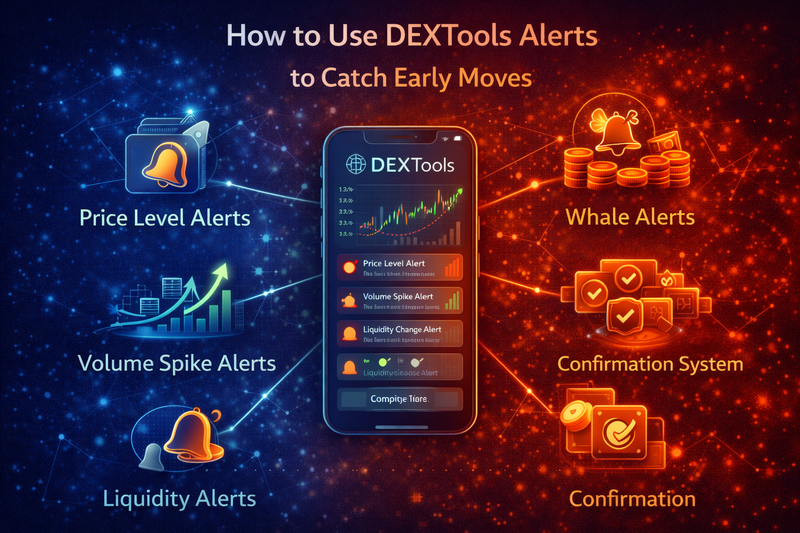
- Step 3: Choose Your Alert Type. The alert configuration window will present various alert types. These include Price, Volume, Liquidity, and Large Transaction alerts. Select the type that aligns with your monitoring goal.
- Step 4: Define Alert Conditions.
- Price Alerts: Enter a specific price point (e.g., 'Above 0.05 USDC' or 'Below 0.03 USDC'). You can also set alerts for percentage changes.
- Volume Alerts: Specify a minimum volume threshold for a given timeframe (e.g., 'Volume > $1,000,000 in 5 minutes').
- Liquidity Alerts: Set conditions for additions or removals (e.g., 'Liquidity Added > $500,000' or 'Liquidity Removed > $100,000').
- Large Transaction Alerts: Define a minimum transaction size (e.g., 'Buy Transaction > $25,000' or 'Sell Transaction > $10,000').
- Step 5: Select Notification Channels. DEXTools typically offers notifications via browser push, email, and Telegram. Select your preferred method(s) to receive alerts. Ensure your Telegram account is linked if you choose that option.
- Step 6: Name and Save Your Alert. Give your alert a descriptive name (e.g., 'ETH/USDC Resistance Breakout'). Review all settings to ensure accuracy, then click 'Save' or 'Create Alert'. Your alert will now be active.
- Step 7: Manage Existing Alerts. You can view, edit, or delete your active alerts from the 'My Alerts' section, usually accessible from the main DEXTools dashboard or the alerts panel. Regularly review and update your alerts to match evolving market conditions and trading strategies.
Strategic Price Level Alerts: The Foundation
Price alerts are the cornerstone of any effective trading setup. They notify you when a token's price crosses a predefined threshold, signaling potential shifts in market sentiment or structure. DEXTools allows for precise configuration, moving beyond simple 'above/below' notifications.
Instead of setting alerts at obvious round numbers, focus on key technical levels derived from chart analysis. These include historical support and resistance, Fibonacci retracement levels, or pivot points. Smart traders watch for price action around these levels, not just at them.
- Breakout Alerts: Position alerts slightly above significant resistance levels. A sustained move past resistance often indicates early momentum and a potential uptrend.
- Breakdown Alerts: Set alerts just below crucial support levels. A break below support can signal weakness, prompting you to protect capital or prepare for further downside.
- Retest Alerts: Configure alerts near previous breakout or breakdown levels. A successful retest (price returning to the level and bouncing) can confirm the strength of the initial move.
Monitoring Volume Spikes for Confirmation
Volume is a critical indicator that validates price movements and confirms market intent. A price breakout without accompanying significant volume is often unreliable and prone to failure. DEXTools' volume alerts help you distinguish genuine interest from fleeting fluctuations.
Set alerts for sudden increases in transaction activity, especially when combined with a specific price direction. Look for rising buy pressure relative to sell pressure, or consistent volume during consolidation phases that might precede a breakout. These signals provide stronger conviction for your trading decisions.
Tracking Liquidity Changes for Pre-Volatility Signals
Liquidity shifts often precede significant price volatility and rapid market moves. Monitoring these changes can give you an early heads-up on potential pumps or dumps. DEXTools provides granular data on liquidity pool dynamics, which can be leveraged for strategic alerts.
Configure alerts for substantial liquidity additions, particularly during consolidation periods, which might indicate smart money preparing for an upward move. Conversely, sudden large liquidity removals during rallies could signal impending sell-offs or rug pulls. Understanding these shifts adds crucial context beyond simple chart patterns.
Observing Large Transactions (Whale Activity)
Whale activity often dictates the direction of decentralized markets. Tracking large transactions can reveal informed positioning by significant holders. DEXTools' large transaction alerts empower you to follow the money, identifying potential accumulation or distribution phases.
Set alerts for large buy transactions entering pools, especially if they occur consistently over time, indicating accumulation. Similarly, sudden large sells can signal market instability or profit-taking. Strong buys preceding a breakout often suggest that informed players are positioning themselves, providing a valuable leading indicator.
Combining Alerts for Stronger Confirmation
While individual alerts are useful, layering them creates a powerful, multi-factor confirmation system. Relying on a single alert type can lead to false signals and noise. DEXTools excels at providing the data points necessary to build sophisticated, layered alerts.
For instance, instead of just a price breakout alert, combine it with a volume spike alert and a large buy transaction alert. When multiple signals align across different on-chain metrics, the probability of a profitable move significantly increases. This structured approach reduces risk and enhances decision-making confidence.
Best Practices for Alert Management
Effective alert management is crucial for long-term trading success. Over-alerting can lead to alert fatigue, causing you to miss genuinely important signals. Under-alerting means missing opportunities. Striking the right balance is key.
- Curate Your Watchlist: Before setting alerts, focus on a curated watchlist of high-potential tokens. Use DEXTools to filter pairs based on growing liquidity, increasing unique wallet activity, and healthy distribution patterns.
- Align Alerts with Your Thesis: Strategically configure alerts that align with a clear trading thesis, rather than setting them randomly. Each alert should serve a specific purpose within your strategy.
- Regularly Review and Adjust: Market conditions are constantly evolving. Periodically review your active alerts, adjust thresholds, or deactivate irrelevant ones. An alert set months ago might no longer be valid.
- Test and Refine: Start with a few key alerts and observe their effectiveness. Refine the conditions based on how useful the notifications are in practice.
Risks and Things to Watch Out For
While DEXTools alerts are powerful tools, they are not foolproof and come with inherent risks. Understanding these limitations is crucial for responsible trading.
Conclusion: Empowering Your Trading with DEXTools Alerts
DEXTools alerts are an indispensable tool for anyone serious about navigating the fast-paced world of on-chain trading. By providing real-time notifications on critical price levels, volume spikes, liquidity shifts, and whale activity, they empower traders to move proactively rather than reactively.
Mastering the art of setting and managing these alerts, combined with a disciplined trading strategy and continuous market analysis, can significantly enhance your ability to identify early trading opportunities. Leverage DEXTools to transform raw on-chain data into actionable intelligence, giving you a distinct advantage in the competitive crypto landscape.
Frequently Asked Questions
How do I set up DEXTools price alerts?
Navigate to a token pair page, click the bell icon, and configure your desired price.
What types of alerts can I set on DEXTools?
You can set price alerts for specific token values.
Is a DEXTools subscription required for alerts?
Yes, a premium subscription is typically needed for advanced features like alerts.
Can I receive DEXTools alerts on my phone?
Alerts are generally delivered via desktop notifications or email depending on your settings.
How do I manage my existing DEXTools alerts?
Access your profile or settings section to view and modify active alerts.
Are DEXTools alerts real time?
DEXTools strives for near real time delivery of price alerts.
Can I set alerts for multiple tokens at once?
You need to set alerts individually for each token pair.
What information do I need to set a DEXTools alert?
You need the token pair and the specific price point you want to be alerted at.