How to Use Uniswap: Swap ETH Step by Step (2026)
— By Tony Rabbit in Tutorials
Learn how to use Uniswap step-by-step for token swaps, from connecting your wallet to understanding slippage and gas fees.
Using Uniswap involves connecting a Web3 wallet like MetaMask to the app.uniswap.org interface, selecting the tokens you wish to swap, entering the amount, reviewing transaction details (including gas fees and slippage), and confirming the transaction in your wallet. It's a non-custodial process, meaning your funds remain in your control throughout the swap.
What is Uniswap? Your Gateway to Decentralized Trading
Uniswap is the largest decentralized exchange (DEX) protocol, primarily operating on the Ethereum blockchain but also supporting several other EVM-compatible networks. It allows users to swap ERC-20 tokens directly from their crypto wallets without the need for an intermediary or a centralized order book. Instead, Uniswap utilizes an Automated Market Maker (AMM) model, where trades are executed against liquidity pools funded by other users.
Why Use Uniswap? Benefits of Decentralized Swapping
Uniswap offers several compelling advantages over traditional centralized exchanges (CEXs):
- Decentralization: No single entity controls your funds or the trading process.
- Accessibility: Trade thousands of tokens, including newly launched or niche assets not available on CEXs.
- Non-Custodial: You retain full control and ownership of your assets at all times.
- Transparency: All transactions are recorded on the blockchain, providing full auditability.
- Privacy: No KYC (Know Your Customer) requirements; trade directly from your wallet.
Prerequisites: What You Need Before Your First Swap
Before you can begin swapping tokens on Uniswap, ensure you have the following:
- A Compatible Web3 Wallet: MetaMask is the most popular choice, but others like Coinbase Wallet, Trust Wallet, or Ledger (via WalletConnect) are also supported. Make sure it's installed and set up.
- Native Blockchain Token for Gas Fees: For swaps on Ethereum, you'll need ETH. For Polygon, MATIC; for Arbitrum, ETH; and so on. These tokens pay for the transaction fees (gas).
- The Tokens You Wish to Swap: Either the token you want to trade from (e.g., ETH) or the token you want to trade for (e.g., USDC).
Step-by-Step Guide: How to Swap Tokens on Uniswap
This section will walk you through the core functionality of Uniswap: swapping one token for another.
- Step 1: Navigate to the Official Uniswap App. Always type
app.uniswap.orgdirectly into your browser's address bar or use a trusted bookmark. This prevents you from landing on phishing sites. - Step 2: Connect Your Crypto Wallet.
On the Uniswap interface, locate and click the 'Connect Wallet' button, usually in the top right corner. A list of supported wallets will appear. Select your wallet (e.g., MetaMask).
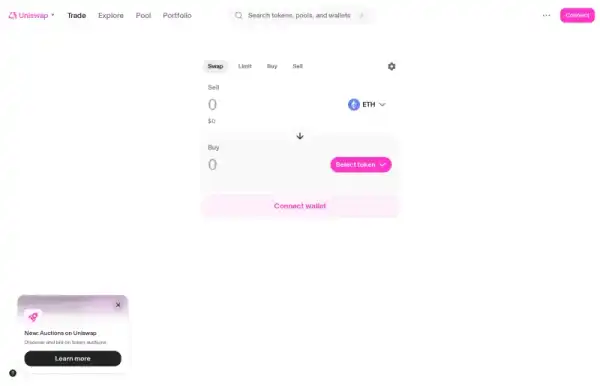
A pop-up will appear from your wallet asking for permission to connect. Review the requested permissions and approve the connection. Once connected, your wallet address and a portion of your balance will be visible in the header.
- Step 3: Select Your Swap Tokens.
In the swap interface, you'll see two fields: 'You pay' (top) and 'You receive' (bottom).
- Click the token icon in the 'You pay' field to select the token you want to swap from (e.g., ETH).
- Click the token icon in the 'You receive' field to select the token you want to swap to (e.g., USDC).
You can search for tokens by name or paste their contract address. Be cautious when adding custom tokens and always verify the contract address from reliable sources like CoinGecko or DEXTools to avoid scams.
- Step 4: Enter the Swap Amount.
Enter the amount of the 'You pay' token you wish to swap. Uniswap will automatically calculate the estimated amount of the 'You receive' token you will get, based on current market rates and liquidity.
- Step 5: Review Swap Details and Settings.
Before confirming, carefully review the transaction details presented by Uniswap:
- Exchange Rate: The current conversion rate between the two tokens.
- Price Impact: The estimated percentage change in the market price of the tokens caused by your trade. Large trades on low-liquidity pairs can have high price impact.
- Minimum Received: The minimum amount of the 'You receive' token you are guaranteed to get, even if the price fluctuates slightly during the transaction.
- Network Fee (Gas): The cost in the native blockchain token (e.g., ETH) to process your transaction on the network. This fee is paid to network validators, not Uniswap.
You can also click the gear icon (settings) to adjust your slippage tolerance.
- Step 6: Execute the Swap.
If all details look correct, click the 'Swap' button. Your wallet will then prompt you to confirm the transaction. Review the gas fees and total amount one last time in your wallet pop-up. Click 'Confirm' to send the transaction to the blockchain.
- Step 7: Monitor Your Transaction.
Once confirmed, your transaction will be pending on the blockchain. You can view its status on a block explorer (like Etherscan for Ethereum) by clicking the transaction link provided by Uniswap or your wallet. Once confirmed, the swapped tokens will appear in your wallet.
Understanding Key Swap Parameters: Price Impact, Slippage, and Gas
To become a proficient Uniswap user, it's crucial to understand these terms:
Price Impact
Price impact refers to how much your trade affects the price of the tokens in the liquidity pool. When you buy a token, you reduce its supply in the pool and increase the supply of the token you're selling, which can shift the price. Larger trades relative to the pool's size will have a higher price impact. Aim to keep price impact below 1% for most trades to ensure you get a fair price.
Slippage Tolerance
Slippage is the difference between the expected price of a trade and the actual price at which the trade is executed. This can occur due to market volatility or large orders. Slippage tolerance is the maximum percentage of price movement you are willing to accept before your transaction reverts. Uniswap's default is usually 0.5%.
Network Fees (Gas)
Gas fees are payments made by users to compensate for the computing energy required to process and validate transactions on a blockchain. On Ethereum, these fees are paid in ETH. Gas prices fluctuate based on network congestion. You cannot set gas fees directly on Uniswap, but your wallet will show you the estimated cost before you confirm. For smaller transactions, consider using Uniswap on a Layer 2 network (like Arbitrum or Optimism) to significantly reduce gas costs.
Advanced Uniswap Features: Providing Liquidity
Beyond swapping, Uniswap allows users to become liquidity providers (LPs) and earn a portion of trading fees. This is an advanced feature with its own risks.
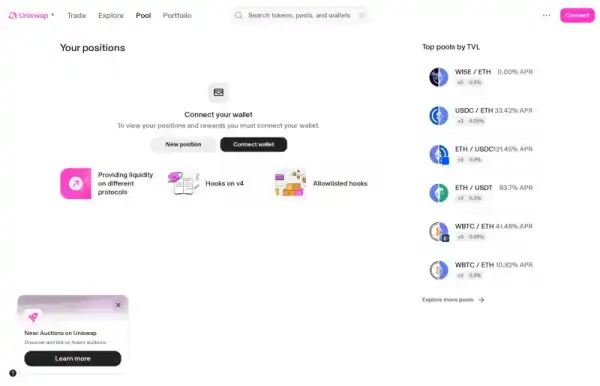
- Navigate to the 'Pool' Section: On the Uniswap app, click 'Pool' in the top navigation.
- Create a New Position: Click 'New Position' to start providing liquidity.
- Select Token Pair and Fee Tier: Choose the two tokens for which you want to provide liquidity (e.g., ETH/USDC) and select a fee tier (e.g., 0.05%, 0.3%, 1%). Higher fee tiers are for more volatile pairs.
- Set Your Price Range (Concentrated Liquidity): With Uniswap v3 and later, you can provide liquidity within a specific price range. This is called concentrated liquidity and allows for greater capital efficiency but also higher risk.
- Enter Amounts and Confirm: Enter the amounts of both tokens you wish to deposit. Review the details, click 'Add Liquidity', and confirm the transaction in your wallet.
Understanding Liquidity Risks: Impermanent Loss
The primary risk for liquidity providers is impermanent loss. This occurs when the price ratio of the tokens you deposited into a liquidity pool changes from when you deposited them. The greater the price divergence, the greater the impermanent loss. While you still earn trading fees, these fees may not always offset the impermanent loss, potentially resulting in a lower dollar value than if you had simply held the tokens in your wallet.
Uniswap on Layer 2s: Faster and Cheaper Swaps
To combat high gas fees and slow transaction times on the Ethereum mainnet, Uniswap has expanded its support to several Layer 2 (L2) scaling solutions. These include:
- Arbitrum: A popular optimistic rollup offering faster and cheaper transactions.
- Optimism: Another optimistic rollup with a similar goal to Arbitrum.
- Polygon: A sidechain that provides a scalable and low-cost environment.
- Base: Coinbase's Ethereum L2, built on Optimism's OP Stack.
- BNB Chain: While not an L2, it's a separate EVM-compatible chain with lower fees.
To use Uniswap on an L2, you'll need to bridge your tokens from Ethereum mainnet to the chosen L2, and ensure you have the native token of that L2 for gas fees.
Security Best Practices for Uniswap Users
- Verify URLs: Always double-check that you are on
app.uniswap.org. Phishing sites are common. - Never Share Seed Phrase: Your wallet's seed phrase is the master key to your funds. Never share it with anyone.
- Be Wary of Unknown Tokens: Research any token before swapping. Scammers often create fake tokens to trick users.
- Monitor Approvals: Regularly review and revoke token approvals for dApps you no longer use or trust.
- Use a Hardware Wallet: For larger amounts, a hardware wallet (like Ledger or Trezor) provides an extra layer of security.
- Understand Slippage: Avoid excessively high slippage tolerance to mitigate sandwich attack risks.
How DEXTools Enhances Your Uniswap Experience
While Uniswap provides the core swapping functionality, tools like DEXTools offer crucial insights that can significantly improve your trading decisions. DEXTools provides real-time price charts, liquidity data, transaction history, and token information for thousands of pairs across various DEXs, including Uniswap. You can identify trending tokens, analyze market sentiment, and make more informed decisions before executing a swap on Uniswap, helping you spot potential risks or opportunities that the basic Uniswap interface might not highlight.
Conclusion: Mastering Your Uniswap Swaps
Uniswap has revolutionized decentralized trading, offering unparalleled access to a vast array of tokens without intermediaries. By understanding the step-by-step process of connecting your wallet, executing swaps, and grasping key concepts like slippage and gas fees, you can confidently navigate the world of DEX trading. Remember to prioritize security, stay informed about market conditions, and leverage complementary tools like DEXTools to enhance your trading strategy.
Frequently Asked Questions
What is Uniswap?
Uniswap is a decentralized exchange (DEX) protocol that allows users to swap ERC-20 tokens directly from their crypto wallets without needing a centralized intermediary or order book. It uses an Automated Market Maker (AMM) model.
Is Uniswap safe to use?
Yes, Uniswap is generally considered safe as a protocol, being non-custodial and audited. However, users must be vigilant against phishing sites, smart contract vulnerabilities in tokens they swap, and managing their own wallet security.
What do I need to use Uniswap?
You need a compatible Web3 wallet (like MetaMask), the native token of the blockchain you're using (e.g., ETH for Ethereum) to cover gas fees, and the tokens you wish to swap.
How do I connect my wallet to Uniswap?
Go to app.uniswap.org, click 'Connect Wallet' in the top right corner, select your wallet from the list, and approve the connection in your wallet's pop-up.
What is slippage tolerance on Uniswap?
Slippage tolerance is the maximum percentage difference you're willing to accept between the expected price of your trade and the actual execution price. If the price moves beyond this tolerance, your transaction will fail.
Why are Uniswap gas fees so high?
Gas fees on Uniswap (specifically on the Ethereum mainnet) can be high due to network congestion. These fees are paid to network validators, not Uniswap. Using Uniswap on Layer 2 networks like Arbitrum or Optimism can significantly reduce gas costs.
Can I lose money providing liquidity on Uniswap?
Yes, providing liquidity carries the risk of impermanent loss. This occurs when the price ratio of the tokens you deposited changes, potentially resulting in a lower dollar value than if you had simply held the tokens.
How do I find new tokens on Uniswap?
While Uniswap's interface allows searching, using platforms like DEXTools can help you discover new and trending tokens, analyze their liquidity, and review their contract details before swapping.
What is the difference between Uniswap and a centralized exchange?
Uniswap is decentralized, non-custodial (you control your funds), requires no KYC, and uses AMMs. Centralized exchanges are custodial (they hold your funds), require KYC, and typically use order books.