Send Crypto from Kraken to Trust Wallet: 2026 Guide
— By Tony Rabbit in Tutorials

Send crypto from Kraken to Trust Wallet safely in 2026 by matching the right asset, address, and network, plus using a test send before moving real size.
Sending crypto from Kraken to Trust Wallet is the classic exchange-to-self-custody move. The user already owns the asset. The real job now is execution discipline: copy the correct receiving address, match the correct network, and confirm the route before the transfer becomes irreversible.
This is where beginners get into trouble. They treat the address and the network as separate decisions, or they rush the send because the flow looks easy. In reality, most mistakes happen before the transaction is even broadcast.
Quick answer
- Open Trust Wallet first and get the receiving details from the exact asset you want to receive.
- On Kraken, confirm the asset, address, and network together, not one field at a time.
- If the amount matters, send a small test transaction before the full transfer.
Why Move Crypto from Kraken to Trust Wallet?
Kraken is useful for buying, selling, and holding exchange balances. Trust Wallet is useful when you want self-custody, on-chain access, and the ability to manage assets directly from your own wallet. So this transfer is usually the handoff from exchange convenience into wallet responsibility.
If you want the wallet basics first, read our Trust Wallet beginner guide. If you want the exchange overview first, read our Kraken guide.
Kraken to Trust Wallet checklist
Step 1: Get the Receive Details From Trust Wallet First
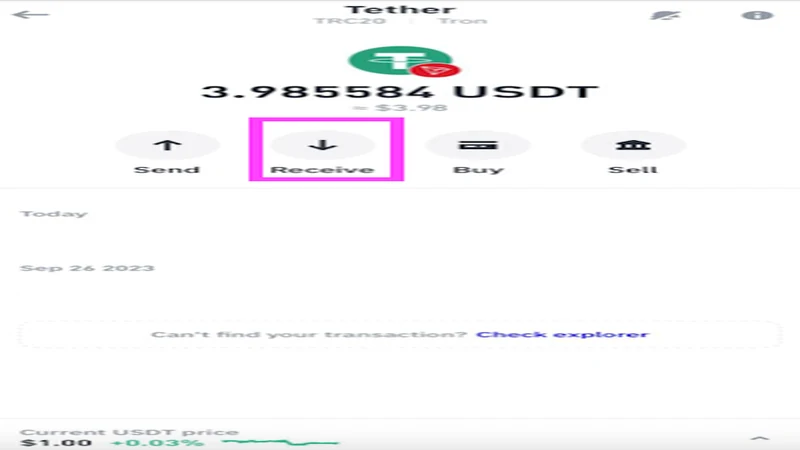
Start in the wallet. Open the exact asset in Trust Wallet, tap receive, and copy the address from that flow. That way the destination defines the route instead of the exchange menu defining the route for you.
What matters most before you hit send
How Long Does a Kraken to Trust Wallet Transfer Take?
Timing depends on the asset, the chain, and current network conditions. The important part is that speed does not prove correctness. A fast transfer on the wrong route is still the wrong transfer. That is why address and network verification matter more than trying to optimize for speed.
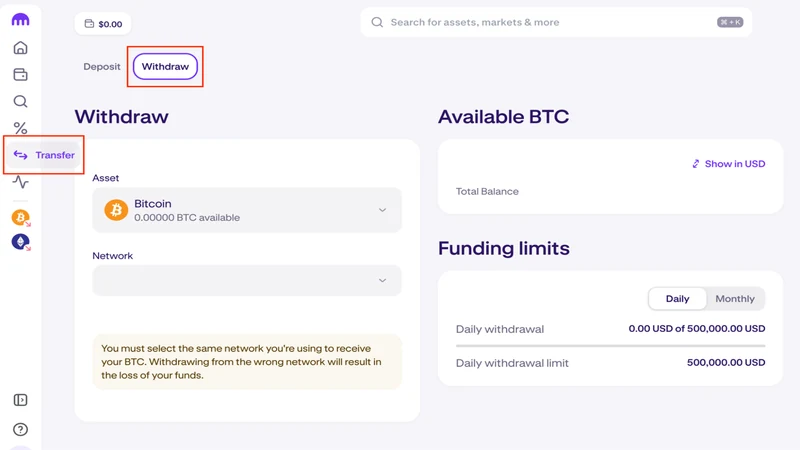
Step 2: Set Up the Withdrawal on Kraken Carefully
Once the receiving details are ready, go back to Kraken and fill in the transfer slowly. The point is not speed. The point is correctness. If the route supports several networks or address formats, stop and read each field as a single combined decision.
Step 3: Use a Test Send for Meaningful Amounts
A test withdrawal is still the best beginner habit in crypto. If a small amount lands correctly in Trust Wallet, you have real proof that the route, asset, and destination all match before sending the rest.
Kraken to Trust Wallet flow
Step 4: Verify the Balance in Trust Wallet Before You Use It
After Kraken shows the transfer as complete, confirm the balance inside Trust Wallet before moving on to swaps, staking, or dApps. If the funds are not immediately visible, first check the network and token view before assuming the transfer failed.
Common Kraken to Trust Wallet Mistakes to Avoid
Mistakes that repeat constantly
Frequently Asked Questions
Can I send BTC from Kraken to Trust Wallet?
Yes, as long as the receiving address in Trust Wallet is for BTC and the route on Kraken matches it correctly.
Can I send USDT from Kraken to Trust Wallet?
Yes, but this is where chain mismatches happen often because USDT exists on multiple networks.
What if the funds do not appear in Trust Wallet right away?
Check Kraken transfer status first, then confirm the wallet is on the right chain and asset view before assuming anything went wrong.
Related reading
Disclaimer: This article is for educational purposes only and does not constitute investment, tax, or legal advice. Kraken withdrawal options and supported networks can change over time. Always confirm the live asset, address, and chain before sending funds.