How to Use Crypto.com: Complete Exchange and App Tutorial (2026)
— By Tony Rabbit in Tutorials

Learn how to use Crypto.com's comprehensive ecosystem in 2026, from account setup and funding to maximizing Visa card rewards, trading, and DeFi.
How to Use Crypto.com: Complete Exchange and App Tutorial (2026)
To use Crypto.com, download the mobile app, complete KYC verification, deposit funds via bank transfer or card, and then explore its diverse features like the Crypto.com Visa card for cashback, the Crypto.com Exchange for advanced trading, the Earn program for passive income, and the DeFi Wallet for self-custody. The platform offers a unified ecosystem for managing, trading, and spending cryptocurrencies, catering to both beginners and experienced users.
Crypto.com has evolved from a simple crypto exchange into one of the most comprehensive financial ecosystems in the digital asset space, serving over 100 million users across 90+ countries. With its signature Visa card program offering up to 5% cashback in CRO tokens, a full-featured trading exchange, a non-custodial DeFi wallet, and an earn program for passive income, Crypto.com is designed to be the only crypto platform most users need. This complete tutorial walks you through every aspect of the Crypto.com ecosystem in 2026.
Understanding the Crypto.com Ecosystem: App vs. Exchange
The first crucial distinction for newcomers is that Crypto.com operates two primary, yet distinct, products. Understanding their roles is key to maximizing your experience.
The Crypto.com App
This is the consumer-facing mobile application, designed for everyday users. It's your gateway to fiat deposits, managing the Crypto.com Visa card, utilizing the Earn feature, and performing simple buy/sell transactions with a user-friendly interface.
The Crypto.com Exchange
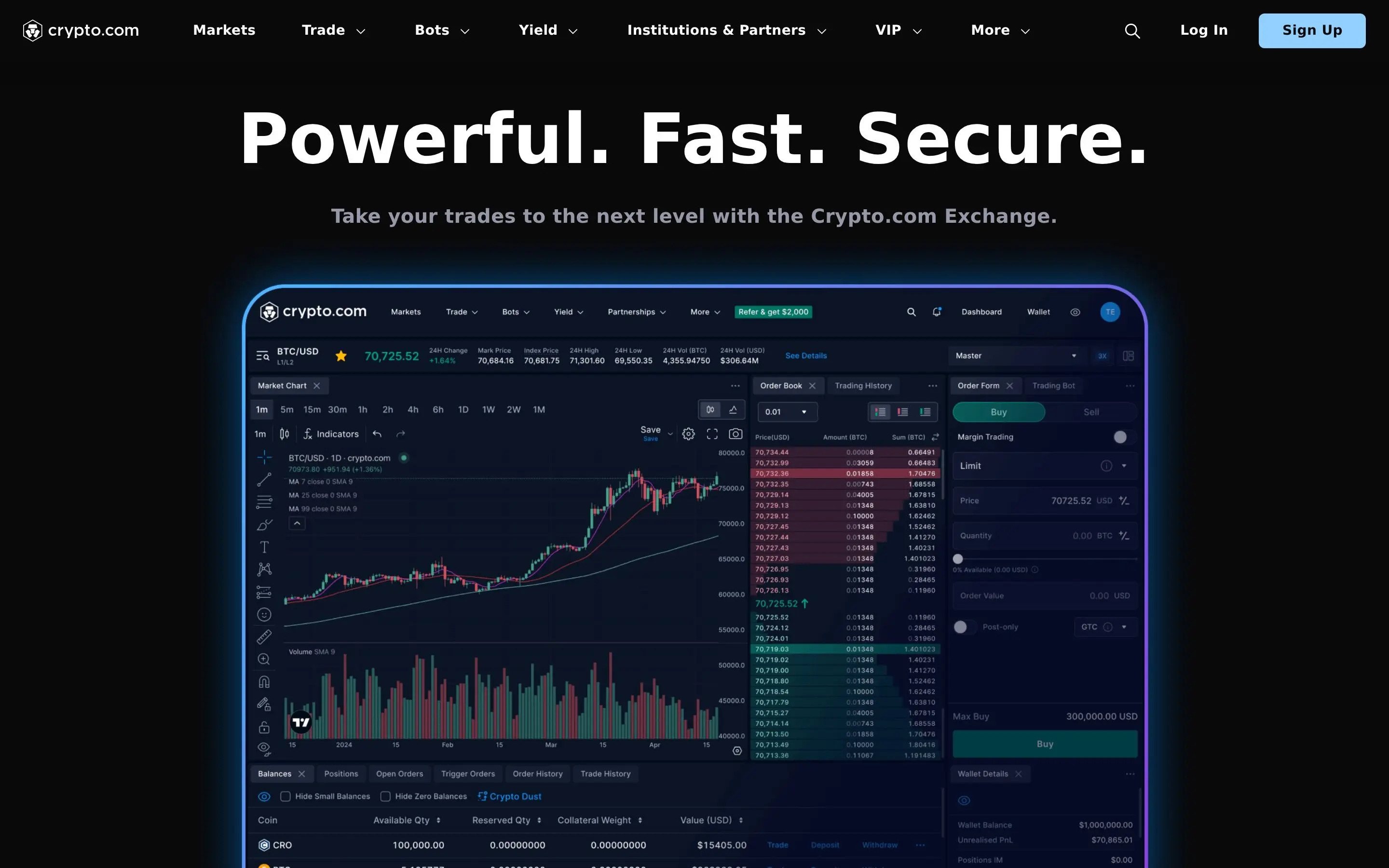
This is a professional trading platform accessible via web browser or a separate mobile app. It caters to active traders with an order book, advanced charting tools, lower trading fees, and access to derivatives like futures and options.
Getting Started: Account Creation and Security
Your journey begins with setting up a secure account.
- Download the App. Get the Crypto.com App from the official App Store (iOS) or Google Play Store (Android).
- Register. Sign up using your email address and create a strong, unique password.
- Complete KYC Verification. This is mandatory for regulatory compliance. You'll need a government-issued ID (passport, driver's license) and a facial recognition selfie. Verification typically completes within 5-15 minutes during business hours, but can take longer in some cases.
- Enhance Security. Immediately enable 2FA (Two-Factor Authentication) using an app like Google Authenticator. Set up biometric login (fingerprint/Face ID) for convenience and an anti-phishing code for email security.

Funding Your Crypto.com Account
Once your account is set up, you'll need to deposit funds to start using the platform.
- Bank Transfers. Crypto.com supports various fiat deposit methods: SEPA for EU, ACH for US, and Faster Payments for UK users. These are typically free but can take 1-3 business days to process. This is the recommended method for larger amounts to avoid fees.
- Credit/Debit Card Purchases. Instant but carry a 2.99% fee after the initial new user fee-free period (which varies by region and promotion). Convenient for quick, smaller purchases.
- Mobile Payment Options. Apple Pay and Google Pay are integrated for quick and seamless purchases directly from your mobile device.
- Cryptocurrency Deposits. You can deposit crypto from an external wallet. Navigate to 'Transfer' -> 'Deposit' -> 'Crypto' in the app, select the cryptocurrency, and generate a deposit address. Always double-check the network and address to avoid loss of funds.
The Crypto.com Visa Card: Your Gateway to Crypto Rewards
The Crypto.com Visa card is arguably the platform's flagship product, offering unparalleled cashback rewards. It functions as a prepaid Visa debit card that you top up with either crypto or fiat, usable anywhere Visa is accepted globally. Every purchase earns CRO cashback instantly.
- Navigate to the Card Tab. In the Crypto.com App, select the 'Card' tab at the bottom.
- Choose Your Tier. Browse the available card tiers and select the one that best fits your needs and budget. The Ruby Steel at a $400 CRO stake is often considered a sweet spot for its 2% cashback and Spotify rebate.
- Stake CRO. To unlock the higher tiers, you must stake the required amount of CRO tokens for 180 days. This means locking them up in your account.
- Order Your Card. Once staked, you can order your physical metal card. It typically ships within 1-2 weeks. You'll receive a virtual card instantly for online purchases.
- Top Up and Spend. Fund your card with fiat currency or cryptocurrency from your Crypto.com App wallet and start spending to earn cashback.
Trading on the Crypto.com Exchange
For more serious traders, the Crypto.com Exchange offers a robust platform.
- Access the Exchange. You can access it via a web browser (exchange.crypto.com) or download the separate Crypto.com Exchange mobile app.
- Transfer Funds. Transfer cryptocurrencies from your Crypto.com App wallet to the Exchange. This transfer is instant and free.
- Spot Trading. Engage in spot trading with an order book. You can place market orders, limit orders, and stop-limit orders. Base fees are 0.075% for makers and takers, which decrease with higher trading volume and CRO staking.
- Margin Trading. Utilize margin trading with up to 10x leverage to amplify potential gains (and losses). This is for experienced traders only.
- Derivatives. Explore perpetual futures and other derivatives for advanced trading strategies.
Earning Passive Income with Crypto.com Earn
The Crypto.com Earn program allows you to generate passive income on your crypto holdings by lending them out for a fixed term.
- Navigate to Earn. In the Crypto.com App, tap the 'Earn' section.
- Select Asset and Term. Choose the cryptocurrency you wish to stake and your preferred term (flexible, 1-month, or 3-month). Longer terms generally offer higher interest rates.
- Confirm and Deposit. Review the estimated annual percentage yield (APY) and confirm your deposit. Your crypto will then start earning interest.
Exploring DeFi with the Crypto.com DeFi Wallet
The Crypto.com DeFi Wallet is a separate, non-custodial wallet that gives you full control over your private keys and assets. It integrates seamlessly with the App but operates independently.
- Download the DeFi Wallet. Install the Crypto.com DeFi Wallet app from your app store.
- Create/Import Wallet. Create a new wallet and securely back up your seed phrase (recovery phrase) offline. Alternatively, import an existing wallet.
- Connect to DApps. Use WalletConnect to interact with various decentralized applications (DApps) on multiple blockchains, including DeFi protocols, NFTs, and GameFi.
- Swap and Farm. The wallet often includes built-in swap features and allows you to participate in liquidity farming directly from the interface.
- Transfer Assets. Easily transfer assets between your Crypto.com App and your DeFi Wallet.
Staking CRO for Ecosystem Benefits
Staking Crypto.com Coin (CRO) is central to unlocking the full potential of the Crypto.com ecosystem. Beyond the Visa card benefits, staking CRO can reduce trading fees on the Exchange and boost your Earn rates.
- Purchase CRO. Acquire CRO tokens through the Crypto.com App or Exchange.
- Stake for Card. As detailed earlier, stake CRO in the App to upgrade your Visa card tier. This is a 180-day lock-up.
- Stake on Exchange. For reduced trading fees, you can stake CRO directly on the Crypto.com Exchange. The more CRO you stake, the lower your maker and taker fees become.
- DeFi Staking. You can also stake CRO directly on the Cronos blockchain through the DeFi Wallet for network validation rewards, offering a different form of passive income.
Advanced Features and Ecosystem Integrations
Beyond the core offerings, Crypto.com continuously expands its ecosystem:
- Crypto.com Pay: Pay merchants with crypto and earn rewards.
- NFT Marketplace: Buy, sell, and showcase NFTs on their integrated marketplace.
- Cronos Chain: Crypto.com's own EVM-compatible blockchain, facilitating faster and cheaper transactions for DeFi and DApps.
- Lending: Borrow fiat or stablecoins using your crypto as collateral.
Security Best Practices on Crypto.com
Protecting your assets is paramount.
- Enable 2FA: Always use Google Authenticator for all accounts.
- Strong, Unique Passwords: Never reuse passwords. Use a password manager.
- Anti-Phishing Code: Set this in your app to verify legitimate emails from Crypto.com.
- Whitelist Addresses: Enable withdrawal address whitelisting for an extra layer of security.
- Be Wary of Scams: Crypto.com will never ask for your password or seed phrase.
- Regularly Review Activity: Check your transaction history and login activity for anything unusual.
How DEXTools Helps Crypto.com Users
While Crypto.com offers extensive tools, platforms like DEXTools provide an invaluable complementary resource for advanced market analysis, especially for users engaging with the DeFi Wallet or exploring tokens not yet listed on centralized exchanges. DEXTools offers real-time price charts, liquidity pool data, and trading insights for decentralized exchanges, helping Crypto.com users make more informed decisions before transferring assets to external DeFi protocols or identifying emerging tokens.
Conclusion
Crypto.com has built a robust and multifaceted ecosystem designed to cater to nearly every aspect of a crypto user's financial life. By understanding the distinction between the App and the Exchange, leveraging the Visa card for daily rewards, exploring passive income opportunities, and engaging with DeFi, users can fully harness the power of this comprehensive platform in 2026 and beyond. Always prioritize security and conduct your own research to make the most of your crypto journey.
Frequently Asked Questions
What is Crypto.com?
Crypto.com is a comprehensive cryptocurrency platform offering a mobile app for everyday users, a professional trading exchange, a Visa card with crypto cashback, a DeFi wallet, and an earn program for passive income.
What's the difference between the Crypto.com App and the Crypto.com Exchange?
The App is for beginners and daily use (fiat deposits, Visa card, simple buy/sell), while the Exchange is for professional traders (order book, lower fees, advanced charts, derivatives).
How do I get a Crypto.com Visa card?
You must download the Crypto.com App, complete KYC, navigate to the 'Card' tab, select your desired tier, and stake the required amount of CRO tokens for 180 days.
How do I deposit money into Crypto.com?
You can deposit fiat via bank transfer (SEPA, ACH, Faster Payments) which is free but takes 1-3 days, or instantly via credit/debit card (with a 2.99% fee after the promo period), Apple Pay, or Google Pay. You can also deposit cryptocurrencies from external wallets.
Is Crypto.com safe to use?
Crypto.com employs robust security measures including 2FA, anti-phishing codes, and cold storage for assets. However, users must also practice strong personal security habits like using unique passwords and enabling all security features.
What is CRO staking and why should I do it?
Staking CRO (Crypto.com Coin) involves locking up your tokens for a period to receive benefits like higher cashback rates on the Visa card, reduced trading fees on the Exchange, and boosted interest rates on the Earn program.
What is the Crypto.com DeFi Wallet?
It's a separate, non-custodial wallet where you hold your own private keys, giving you full control over your crypto. It allows interaction with DApps, swapping tokens, and participating in DeFi protocols.
Can I trade advanced options like margin or futures on Crypto.com?
Yes, the Crypto.com Exchange offers margin trading with leverage and derivatives like perpetual futures, but these are high-risk products suitable only for experienced traders.
How do I earn passive income on Crypto.com?
Through the Crypto.com Earn program in the App, you can stake various cryptocurrencies for fixed terms (1-month, 3-month) or flexible terms to earn interest, with rates often boosted by higher CRO stakes.