Como usar Gate.io Exchange: tutorial completo de trading (2026)
— By Tony Rabbit in Tutorials

Tutorial completo de Gate.io 2026. Trading spot, futuros, copy trading y launchpad.
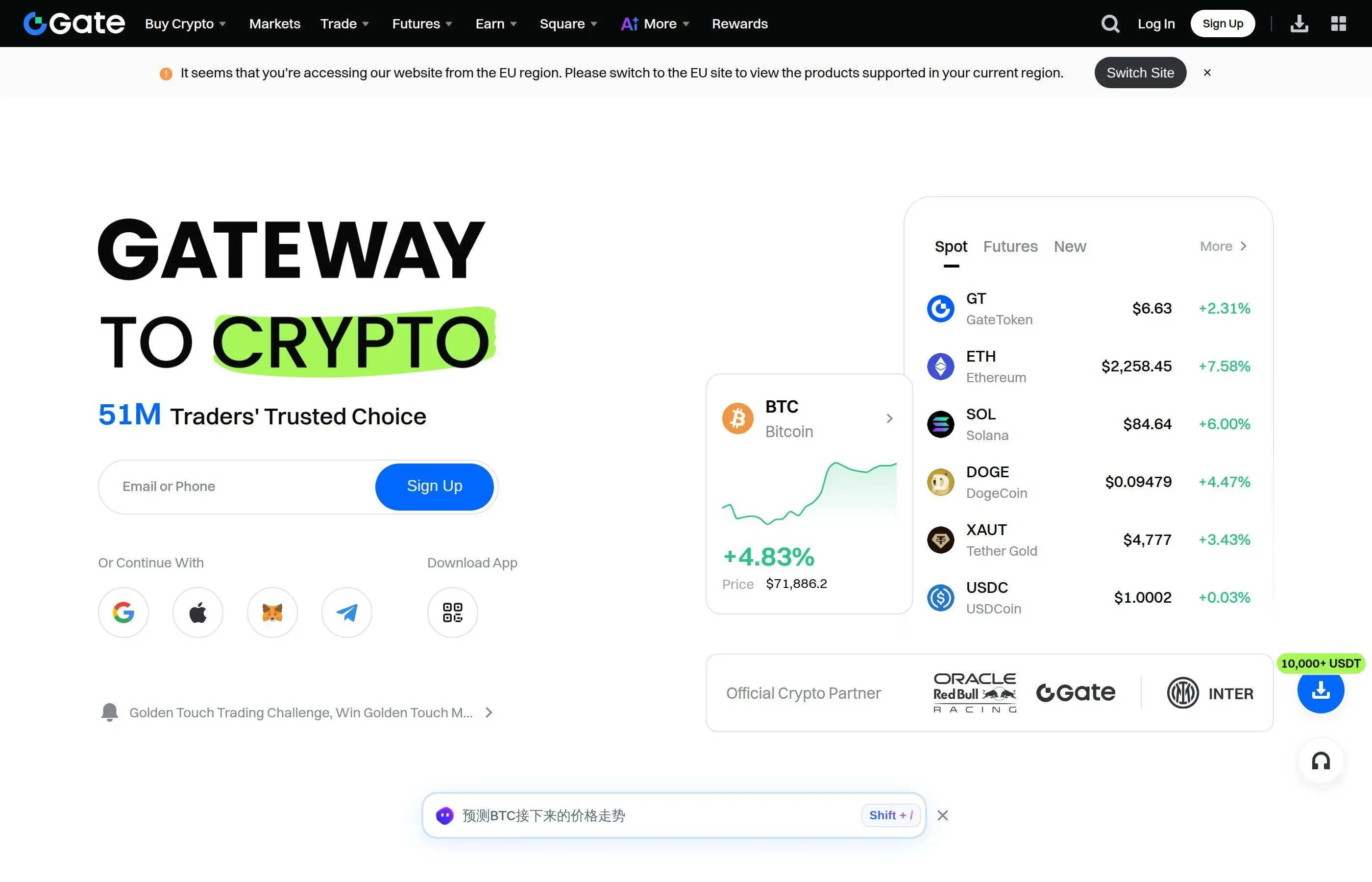
Gate.io is one of the longest-running cryptocurrency exchanges in the industry, founded in 2013 and serving over 16 million users across 190+ countries in 2026. The platform lists more than 2,000 cryptocurrencies and supports spot trading, futures with up to 125x leverage, copy trading, a startup launchpad (IEO), staking, and lending products. Whether you are a beginner exploring your first altcoin purchase or an advanced trader hunting leveraged setups, this tutorial walks you through every feature on Gate.io step by step.
Table of Contents
- Gate.io Overview and Key Stats
- Account Setup and KYC Verification
- Dashboard Navigation
- Deposits and Withdrawals
- Spot Trading Step by Step
- Futures Trading (Up to 125x)
- Copy Trading
- Startup Launchpad (IEO)
- Security Best Practices
- Fees Comparison vs Competitors
- GT Token Utility
- Pros and Cons
- FAQ
- Related Tutorials
1. Gate.io Overview and Key Stats
Gate.io was launched in 2013 under the name Bter before rebranding in 2017. Over the past 13 years, it has grown into a top-10 exchange by trading volume, consistently ranking among the platforms with the widest altcoin selection. As of early 2026, Gate.io processes roughly $4 billion in daily spot volume and over $8 billion in derivatives volume.
Key Platform Stats (2026)
- Founded: 2013 (as Bter, rebranded 2017)
- Registered Users: 16+ million
- Supported Coins: 2,000+ cryptocurrencies
- Trading Pairs: 3,000+
- Futures Leverage: Up to 125x
- Spot Fees: 0.2% maker / 0.2% taker (base rate)
- Supported Countries: 190+
- Native Token: GT (GateToken)
Compared to competitors like Binance or Bybit, Gate.io stands out for its massive altcoin catalog. It regularly lists new tokens before they appear on larger platforms, making it a popular choice for early-stage altcoin traders.
2. Account Setup and KYC Verification
Creating a Gate.io account takes about five minutes. KYC (Know Your Customer) verification is required for most features including fiat deposits, higher withdrawal limits, and participation in the Startup Launchpad.
Step-by-Step Registration
- Visit Gate.io - Navigate to the official Gate.io website. Double-check the URL to avoid phishing sites. Bookmark the correct page once confirmed.
- Click Sign Up - Choose between email or phone number registration. Enter your details and create a strong, unique password with at least 12 characters, mixing uppercase, lowercase, numbers, and symbols.
- Verify Your Email/Phone - Enter the verification code sent to your email or phone. This confirms you have access to the account recovery method.
- Enable Two-Factor Authentication - Before doing anything else, set up 2FA using Google Authenticator or a similar TOTP app. This is critical for protecting your funds.
- Complete KYC Verification - Go to your profile settings and select Identity Verification. You will need a government-issued ID (passport, national ID, or driver's license) and a selfie. KYC Level 1 unlocks basic features. Level 2 (proof of address) raises daily withdrawal limits significantly.
Tip
KYC verification on Gate.io typically completes within 10-30 minutes during business hours. If you are in a rush, have your documents ready before starting the process.
3. Dashboard Navigation
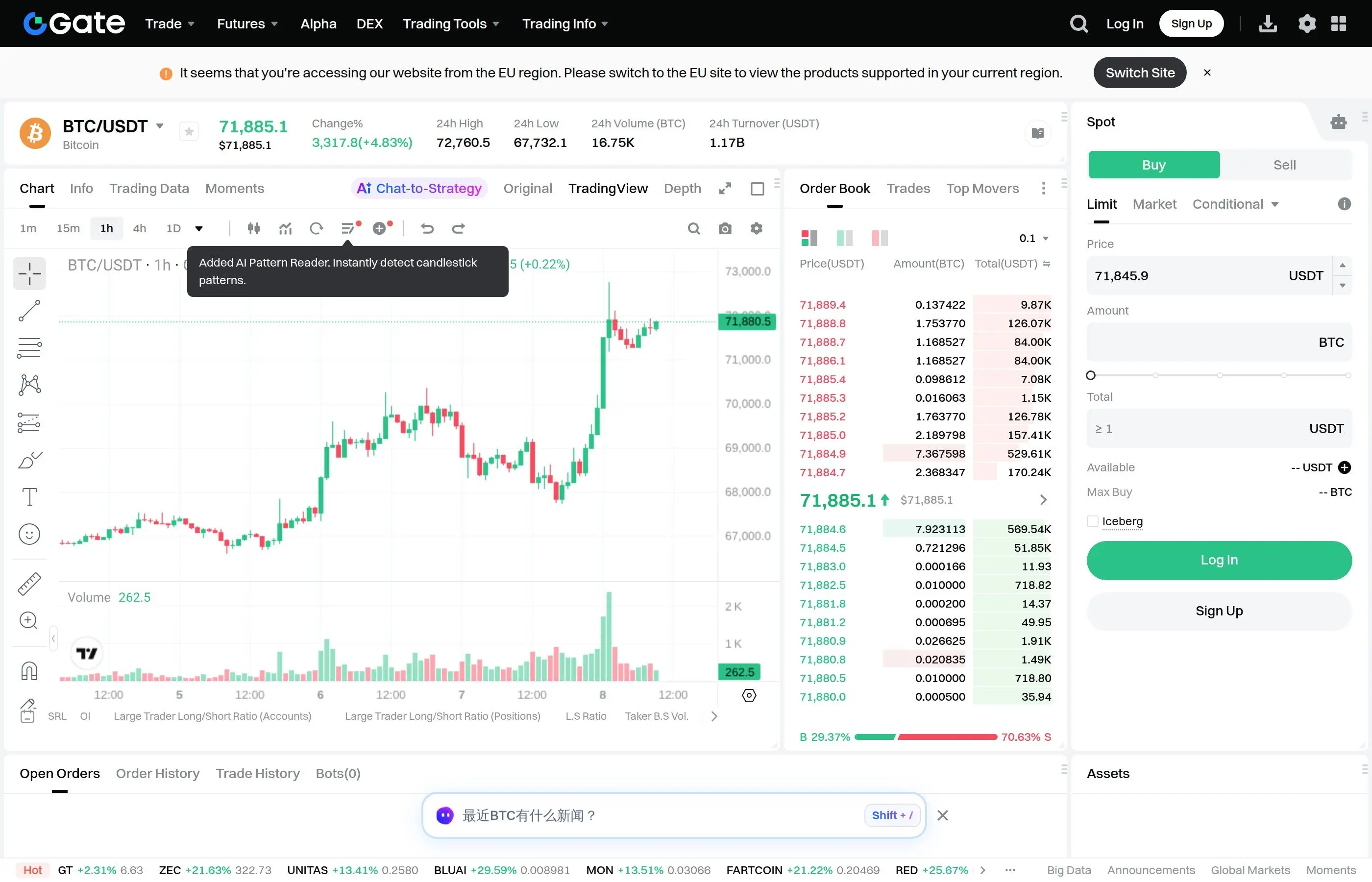
The Gate.io dashboard can feel overwhelming at first glance because of the sheer number of features available. Here is a breakdown of the main sections you will interact with regularly.
Main Navigation Bar
- Trade - Access spot trading, margin trading, and the advanced trading terminal with TradingView charts.
- Derivatives - Futures contracts (USDT-margined and BTC-margined), options, and delivery futures.
- Copy Trade - Follow top-performing traders and mirror their positions automatically.
- Earn - Staking, lending, liquidity mining, and structured products for passive income.
- Startup - The IEO launchpad where you can participate in new token launches at discounted prices.
- NFT - Gate.io's NFT marketplace for buying, selling, and minting NFTs.
- More - Includes Gate Web3 wallet, institutional services, API documentation, and Gate Charity.
Portfolio Overview
Your portfolio dashboard shows balances across all account types: spot, futures, margin, earn, and funding accounts. Gate.io uses a multi-account system, meaning you need to transfer funds between accounts before using specific features. For example, to trade futures you first transfer USDT from your spot account to your futures account.
The interface also features a real-time P&L tracker, asset distribution chart, and transaction history. You can toggle between light and dark mode, though most traders prefer the dark theme for extended screen time.
4. Deposits and Withdrawals
Depositing Crypto
- Navigate to Wallet > Spot Account > Deposit.
- Select the cryptocurrency you want to deposit (e.g., USDT, BTC, ETH).
- Choose the correct network. This is crucial - sending tokens on the wrong network can result in permanent loss. For USDT, you can select TRC20 (Tron) for low fees, ERC20 (Ethereum), or BEP20 (BSC).
- Copy the deposit address or scan the QR code. If you are sending from a wallet like MetaMask, paste this address as the destination.
- Send a small test transaction first, especially for large amounts. Once the test confirms, send the rest.
Warning
Always verify the deposit network matches the sending network. Sending ERC20 tokens to a TRC20 address, or vice versa, will result in lost funds that cannot be recovered.
Depositing Fiat
Gate.io supports fiat deposits via bank transfer, credit/debit card, and third-party payment providers including Banxa, Simplex, and MoonPay. Fees vary by provider but typically range from 1.5% to 3.5% for card purchases. Bank transfers are cheaper but slower, taking 1-3 business days.
Withdrawals
To withdraw, go to Wallet > Spot Account > Withdraw. Enter the destination address, choose the network, and confirm the amount. Withdrawals require email verification and 2FA confirmation. Gate.io processes most crypto withdrawals within 30 minutes, though some may take longer during periods of high network congestion.
For long-term storage of significant holdings, consider moving funds to a cold wallet rather than leaving them on any exchange. Hardware wallets provide an extra layer of security that exchange-based hot wallets cannot match.
Withdrawal Limits
5. Spot Trading Step by Step
Spot trading is the most straightforward way to buy and sell cryptocurrencies on Gate.io. You are exchanging one asset for another at the current market price (or a price you set). Here is the complete process.
Step 1: Fund Your Spot Account
Make sure you have USDT, BTC, ETH, or another quote currency in your spot account. If your funds are in a different account (futures, earn), transfer them via Wallet > Transfer.
Step 2: Find Your Trading Pair
Go to Trade > Spot Trading. Use the search bar in the top-left to find the pair you want. For example, if you want to buy Solana with USDT, search for "SOL" and select the SOL/USDT pair. Gate.io lists pairs against USDT, BTC, ETH, and GT.
Step 3: Analyze the Chart
Gate.io uses TradingView charts with a full suite of indicators, drawing tools, and timeframes. You can set up moving averages, RSI, MACD, Bollinger Bands, and dozens of other technical indicators. The chart also supports multiple layouts so you can monitor several pairs simultaneously.
Step 4: Place Your Order
Gate.io supports several order types for spot trading:
- Market Order - Executes immediately at the best available price. Best for quick entries when speed matters more than exact price.
- Limit Order - You set the exact price. The order fills only when the market reaches your specified price. Preferred by most experienced traders.
- Stop-Limit Order - Triggers a limit order when the price hits your stop price. Useful for setting protective exits or breakout entries.
- Iceberg Order - Splits a large order into smaller visible portions to minimize market impact. Ideal for large-volume trades.
- Post-Only Order - Ensures your order is placed as a maker order, guaranteeing you pay the lower maker fee.
Step 5: Confirm and Monitor
Review your order details, confirm, and monitor it in the "Open Orders" tab below the chart. Filled orders appear in "Order History." Gate.io also provides real-time notifications via the app and email so you never miss a fill.
If you are new to trading and want a more hands-off approach, consider setting up a DCA (Dollar Cost Averaging) strategy to build positions over time without worrying about timing the market perfectly.
Tip
Use limit orders instead of market orders whenever possible. Market orders on low-liquidity altcoins can result in significant slippage, especially for larger trade sizes.
6. Futures Trading (Up to 125x Leverage)
Gate.io offers perpetual futures contracts with leverage up to 125x on major pairs like BTC/USDT and ETH/USDT. Lower-cap altcoins typically support lower maximum leverage (10x to 50x). Futures allow you to profit from both rising and falling markets by going long or short.
USDT-Margined vs Coin-Margined Contracts
Gate.io supports two types of futures contracts:
- USDT-Margined (Linear) - Settled in USDT. Easier to manage because all PnL is calculated in stablecoins. Most popular among retail traders.
- BTC-Margined (Inverse) - Settled in the underlying crypto. Preferred by holders who want to keep exposure to the base asset while trading.
How to Open a Futures Position
- Transfer funds - Move USDT from your spot account to your futures account via Wallet > Transfer.
- Select your contract - Navigate to Derivatives > Futures Trading. Choose your pair (e.g., BTC/USDT perpetual).
- Set leverage - Click the leverage button and adjust. Beginners should start with 2x-5x. Higher leverage amplifies both gains and losses. At 125x, a 0.8% move against your position triggers liquidation.
- Choose margin mode - Isolated margin limits your risk to the margin assigned to that position. Cross margin uses your entire futures balance as collateral, reducing liquidation risk but exposing all funds.
- Place your order - Select Long (buy) or Short (sell), choose your order type (market, limit, or conditional), enter the amount, and confirm.
- Set stop-loss and take-profit - Always set these before the trade moves. You can configure TP/SL when placing the order or afterwards from the positions tab.
Warning
Futures trading with high leverage is extremely risky. Statistics consistently show that the majority of leveraged traders lose money. Never trade with funds you cannot afford to lose, and never use leverage above 10x unless you have significant experience and a strict risk management system in place.
Funding Rate
Perpetual futures on Gate.io use a funding rate mechanism that occurs every 8 hours. When the funding rate is positive, long positions pay short positions. When negative, shorts pay longs. Check the current funding rate before opening a position, as holding through a high funding rate can eat into your profits over time.
If futures trading feels too complex or risky, you might explore Bybit's trading interface which offers a similarly powerful but slightly more streamlined futures experience, or stick with spot trading combined with a solid DCA strategy for lower-risk accumulation.
7. Copy Trading
Gate.io's copy trading feature allows you to automatically replicate the trades of experienced traders. This is especially useful for beginners who have not yet developed their own strategies. For a deeper dive into copy trading concepts and strategies, check out our full copy trading guide.
How Copy Trading Works on Gate.io
- Go to Copy Trade from the main navigation.
- Browse the leaderboard of top traders. Filter by ROI, win rate, total profit, number of followers, or trading style (spot, futures, or both).
- Click on a trader's profile to review their detailed statistics: historical PnL, maximum drawdown, average holding period, preferred assets, and risk score.
- Click Copy and configure your settings:
- Investment amount (the total capital you allocate to copying this trader)
- Per-trade ratio or fixed amount (how much of your capital goes into each copied trade)
- Stop-loss percentage (auto-stop copying if losses exceed your threshold)
- Take-profit percentage (optional)
- Confirm and let the system handle the rest. All positions opened by the lead trader will be mirrored in your account proportionally.
Tips for Choosing Traders to Copy
- Prioritize consistency over massive short-term gains. A trader with 200% monthly returns likely takes extreme risks.
- Look at the maximum drawdown percentage. Anything above 30% means the trader is comfortable with significant temporary losses.
- Check how long they have been active. Minimum 90 days of trading history is a reasonable baseline.
- Diversify by copying 3-5 different traders with different strategies rather than putting everything into one.
8. Startup Launchpad (IEO)
The Gate.io Startup section is the platform's Initial Exchange Offering (IEO) launchpad. It gives users early access to new token projects at discounted prices before they are listed on the open market. Gate.io has hosted hundreds of Startup events, and many tokens have delivered significant returns post-launch.

How to Participate
- Complete KYC - KYC Level 1 or higher is required for all Startup participation.
- Hold GT tokens - Some Startup events require you to hold a minimum amount of GT (GateToken) for a specified period. The more GT you hold, the higher your allocation in oversubscribed events.
- Subscribe - When a Startup event goes live, navigate to the Startup page and click Subscribe. Enter how much you want to commit (usually in USDT).
- Allocation - If the event is oversubscribed (most popular ones are), Gate.io distributes tokens proportionally based on your subscription amount and GT holdings.
- Trading begins - Once the token officially lists, you can trade it on the spot market. Many traders sell a portion at listing to lock in profits while holding the rest for potential further upside.
Tip
Not every Startup token performs well. Do your own research on the project's team, tokenomics, market fit, and investor backing before committing funds. Treat IEO allocations as speculative investments.
9. Security Best Practices
Gate.io has invested heavily in security over the years, including a reserves proof-of-reserves system and a multi-layer security architecture. However, no exchange is immune to risk. Here is how to maximize the safety of your account and funds.
Essential Security Settings
- Two-Factor Authentication (2FA) - Enable Google Authenticator or another TOTP-based app. SMS-based 2FA is available but less secure due to SIM-swap risks. Always use an authenticator app.
- Anti-Phishing Code - Set a custom anti-phishing code in your security settings. This code appears in every legitimate Gate.io email. If an email does not contain your code, it is a phishing attempt.
- Fund Password - Gate.io allows you to set a separate fund password required for withdrawals and transfers. This adds another layer of protection even if your login credentials are compromised.
- Withdrawal Whitelist - Enable this to restrict withdrawals to pre-approved addresses only. Any new address must be whitelisted (with a 24-hour delay) before funds can be sent there.
- Login Notifications - Turn on alerts for new device logins and IP address changes. Gate.io sends notifications via email and app push when unusual login activity is detected.
- Device Management - Regularly review and remove unrecognized devices from your authorized devices list.
For assets you do not plan to trade actively, the safest approach is transferring them to a hardware cold wallet. Exchange hacks, while rare, have happened throughout crypto history. A cold wallet ensures you maintain full custody of your private keys.
Gate.io's Security Infrastructure
Gate.io publishes regular proof-of-reserves reports, demonstrating that user funds are fully backed. The platform also maintains an insurance fund for futures trading and employs a combination of hot and cold wallet storage, with the majority of user funds kept in cold storage.
10. Fees Comparison vs Competitors
Understanding the fee structure is critical for active traders, as fees directly impact profitability. Here is how Gate.io compares with other major exchanges.
Gate.io's base spot fees of 0.2% are higher than competitors like Binance (0.1%) and MEXC (0% maker). However, Gate.io offers several ways to reduce fees:
- GT Token Deduction - Holding and using GT to pay fees grants a discount of up to 25% off trading fees.
- VIP Tiers - Based on 30-day trading volume and GT holdings. VIP tiers progressively reduce maker and taker fees. At the highest VIP level, spot fees drop to 0.055% maker / 0.065% taker.
- Point Cards - Gate.io occasionally offers point cards that can be used to offset trading fees.
For futures, Gate.io's fees are competitive. The 0.015% maker fee is actually lower than Binance and Bybit, making it an attractive choice for high-frequency futures traders.
11. GT Token Utility
GateToken (GT) is the native utility token of the Gate.io ecosystem. It serves multiple purposes within the platform and has become a meaningful part of the Gate.io experience for active users.
GT Use Cases
- Fee Discounts - Use GT to pay trading fees and receive up to 25% off.
- Startup Participation - GT holdings determine your allocation weight in IEO events. More GT equals larger potential allocations.
- VIP Tier Qualification - GT holdings contribute to your VIP level alongside trading volume.
- Voting - GT holders can vote on which tokens get listed on Gate.io through the community voting mechanism.
- Token Burns - Gate.io conducts quarterly GT burns using a portion of platform revenue, reducing the total supply over time. This deflationary mechanism is designed to support GT's long-term value.
- DeFi and Web3 - GT is used across Gate.io's Web3 ecosystem, including GateChain (the platform's own blockchain) and various DeFi applications built on it.
If you are an active Gate.io user, holding some GT makes sense purely for the fee discounts and Startup allocations. However, like any exchange token, GT's value is tied to the fortunes of the platform itself.
Passive Income: Staking and Earn Products
Gate.io offers a range of passive income products through its Earn section. You can participate in flexible and locked staking for popular assets like ETH, SOL, and ATOM, earning yields that vary based on lock-up periods. Flexible products let you withdraw anytime, while locked products offer higher APYs for committing funds for 7, 14, 30, or 90 days. Additionally, Gate.io provides dual investment, structured products, and liquidity mining for users seeking diversified yield generation strategies.
12. Pros and Cons
Pros
- Largest altcoin selection among major exchanges (2,000+ coins)
- Early access to new tokens via Startup launchpad
- Competitive futures fees (0.015% maker)
- Comprehensive copy trading with detailed trader analytics
- Proof-of-reserves transparency
- Extensive earn products (staking, lending, dual investment)
- Active development with frequent feature updates
- Up to 125x futures leverage on major pairs
- GateChain ecosystem and Web3 integration
Cons
- Higher base spot fees (0.2%) than most competitors
- Interface can feel cluttered and overwhelming for beginners
- Not available in the United States or some other restricted regions
- Liquidity on small-cap altcoins can be thin, leading to slippage
- Customer support response times can be slow during peak periods
- Experienced a security breach in 2019 (though funds were recovered)
- KYC now mandatory, reducing privacy for users who prefer anonymous trading
13. Frequently Asked Questions
Is Gate.io safe to use in 2026?
Gate.io has been operating since 2013 and has implemented proof-of-reserves, multi-signature cold storage, and comprehensive security tools. While no exchange is 100% risk-free, Gate.io is considered a reputable and established platform. Enable all security features (2FA, anti-phishing code, withdrawal whitelist) and keep large holdings in a cold wallet for maximum safety.
Is Gate.io available in the United States?
Gate.io does not serve users in the United States due to regulatory restrictions. US-based traders should consider alternatives like Coinbase, Kraken, or Binance.US that are compliant with US regulations.
What is the minimum deposit on Gate.io?
There is no universal minimum deposit. It depends on the cryptocurrency. For USDT, the minimum deposit is typically around 1 USDT. For BTC, it is a small fraction of a BTC. Always check the specific deposit page for the minimum amount and required confirmations.
How do I reduce trading fees on Gate.io?
Hold GT tokens and enable GT fee deduction for up to 25% off. Increase your 30-day trading volume to qualify for higher VIP tiers. Use limit orders (maker) instead of market orders (taker) where possible, as maker fees are lower at most VIP levels.
Can I use Gate.io without KYC verification?
As of 2026, Gate.io requires KYC verification for most features including deposits, withdrawals, and trading. Unverified accounts have extremely limited functionality. Completing at least KYC Level 1 is effectively mandatory for any meaningful use of the platform.
How does Gate.io compare to Binance?
Gate.io lists more altcoins (2,000+ vs Binance's 400+) and offers earlier access to new tokens. Binance has lower base spot fees (0.1% vs 0.2%), higher liquidity on major pairs, and broader regulatory coverage. Gate.io's futures maker fees are slightly cheaper. The best choice depends on whether you prioritize altcoin variety (Gate.io) or overall liquidity and lower spot fees (Binance).
Does Gate.io have a mobile app?
Yes. Gate.io offers apps for both iOS and Android with full feature parity to the web platform. You can trade spot and futures, manage your portfolio, participate in Startup events, use copy trading, and access earn products all from the mobile app. The app also supports biometric login and push notifications for price alerts and order fills.
What is the maximum leverage on Gate.io futures?
Gate.io offers up to 125x leverage on BTC/USDT and ETH/USDT perpetual contracts. Other major pairs typically support up to 50x-100x, while smaller altcoin pairs are capped at 10x-20x. Remember that higher leverage dramatically increases liquidation risk and should only be used by experienced traders with proper risk management.
Can I transfer crypto from MetaMask to Gate.io?
Yes. Copy your Gate.io deposit address for the token and network you want to receive, then paste it as the destination in your MetaMask wallet when sending. Make sure the network matches (e.g., both set to Ethereum mainnet or both on BSC). Always send a small test transaction first.
What happens if I get liquidated on Gate.io futures?
If your position reaches the liquidation price, the exchange's liquidation engine closes your position automatically. In isolated margin mode, you only lose the margin allocated to that specific position. In cross margin mode, your entire futures account balance is at risk. Gate.io has an insurance fund that helps cover situations where liquidation occurs at a price worse than the bankruptcy price, reducing the chance of socialized losses.
14. Related Tutorials
How to Use Binance Exchange
Complete trading tutorial for the world's largest crypto exchange by volume.
How to Use Bybit Exchange
Full guide to spot and derivatives trading on Bybit.
How to Use MEXC Exchange
Trading tutorial for MEXC with zero maker fees and 2,000+ tokens.
How to Use MetaMask Wallet
Complete guide to setting up and using MetaMask for DeFi and transfers.
Best Cold Wallets 2026
Hardware wallet comparison for secure long-term crypto storage.
How to Copy Trade Crypto
Complete strategy guide for automated copy trading across exchanges.
How to DCA Crypto
Dollar cost averaging guide for building positions with lower risk.
How to Stake Ethereum
Complete ETH staking guide covering validators, pools, and liquid staking.