How to Use TON Telegram Bots and Mini Apps Safely
— By Tony Rabbit in Tutorials
Use TON bots and Mini Apps in Telegram safely: verify handles, understand custody, manage permissions, test withdrawals and check tokens on DEXTools.
Using TON Telegram bots and Mini Apps safely requires verifying the real bot or app handle and understanding if the flow is custodial or wallet-native. Users should not mistake convenience for trust when discovery, conversation, wallet prompts, and token hype occur in one place. Always use small amounts when interacting with new apps.
TON and Telegram fit together unusually well. Distribution, community, and transaction prompts can all live inside the same app, which makes the whole experience feel frictionless. That is the attraction, and it is also the risk. When discovery, conversation, wallet prompts, and token hype happen in one place, users can mistake convenience for trust.
Intent check: This page focuses on Telegram-native TON experiences. If you need the wallet setup first, read How to Use Tonkeeper Wallet on TON Safely. If you need the wallet connection standard behind many apps, read What Is TON Connect and How Do You Use It Safely?
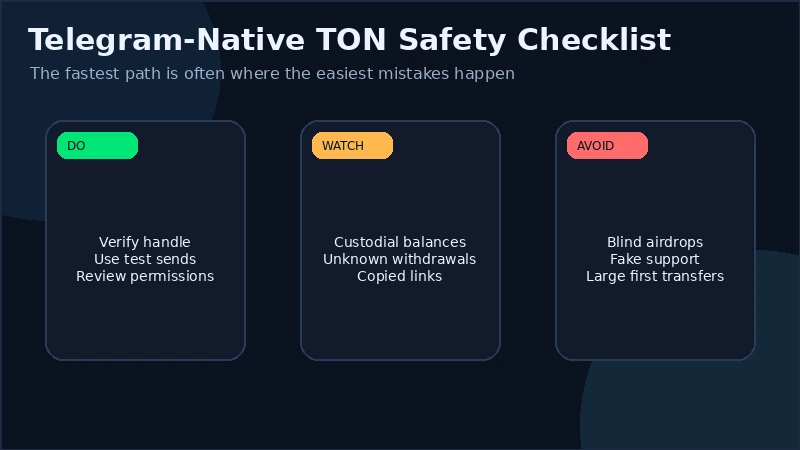
Quick answer: using TON Telegram bots and Mini Apps safely means verifying the real bot or app handle, understanding whether the flow is custodial or wallet-native, using small test transactions, reviewing wallet permissions carefully, and checking any token or market surfaced inside Telegram with DEXTools before you commit size.
- Not every Telegram-native TON tool works the same way. Some hold balances for you, some pass actions to your wallet, and some do both.
- Handles matter. A copied username or cloned Mini App can look legitimate enough to drain a rushed user.
- Custodial convenience and self-custody freedom create different risks. You need to know which one you are using before you fund it.
- Testing is a core safety tool. Deposit small, withdraw small, and learn the workflow before you trust a larger amount.
- Telegram discovery is not due diligence. DEXTools is where token and liquidity claims should be verified.
Why TON and Telegram fit together so well
TON has a natural advantage inside Telegram because the social layer and the action layer can sit next to each other. A user can discover a project in a channel, open a Mini App from a pinned link, connect a wallet, and interact without leaving the broader environment. That is powerful for onboarding and growth.
The TON-native answer: Not.Trade
If the bots compared here serve Solana, Ethereum or Base, the equivalent on TON is Not.Trade, a Telegram-native terminal positioned as the fastest on TON. It brings the same workflow that traders expect from BonkBot, Trojan or GMGN (sniper, copy trade, limit orders, multi-wallet) plus features Solana bots typically lack: MCAP-trigger limit orders and a built-in insider safety panel covering Top 10 holders, snipers, dev wallet movement, bundlers and LP lock status.
Open the Not.Trade complete guide →The problem is that the same design compresses distance between hype and execution. In a browser, a user may instinctively stop and think when a new tab opens. Inside Telegram, the path from discussion to approval can feel much more casual. Safe usage depends on re-introducing friction deliberately, especially when money is involved.
This page is not a general TON setup guide. That role belongs to the umbrella TON tutorial. This page is about operating safely inside Telegram-native TON flows, where fake handles, custody confusion, and rapid approvals create a different risk profile.
Bots vs Mini Apps vs external wallets
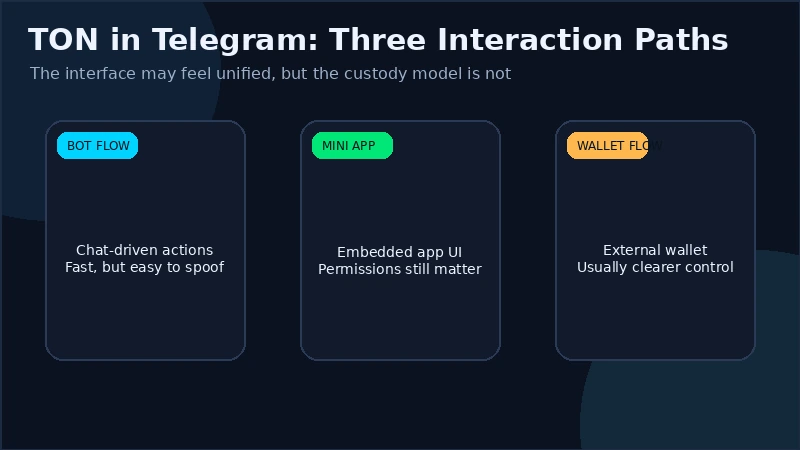
The biggest conceptual mistake is treating every Telegram TON tool as if it were the same. It is not. The safest way to use Telegram-native TON products starts with knowing what kind of flow you are actually in.
| Flow type | What it usually looks like | Main advantage | Main risk |
|---|---|---|---|
| Bot-native or custodial flow | You interact with commands or an internal balance that the bot manages. | Fast and simple onboarding | Counterparty and withdrawal risk |
| Mini App plus wallet connection | The app runs inside Telegram but actions are approved through your wallet. | Convenience with stronger self-custody control | Bad approvals, fake Mini Apps, session sprawl |
| External wallet-native execution | Telegram helps discovery, but the real action is signed in Tonkeeper or another wallet. | Clearer separation between chat and custody | Users still need to verify the source and token |
This distinction is the core of the whole topic. If a bot is holding a balance for you, your main risk is not only bad market exposure. It is counterparty exposure. If a Mini App is using TON Connect, your main risk shifts toward wallet approvals and fake app surfaces. Both can be dangerous, but in different ways.
How to verify the real bot or app before you touch it
The safest route is to start from an official project website or a well-established announcement channel and follow the exact Telegram handle from there. Do not trust search results inside Telegram by default, and do not assume a familiar display name means the handle is correct.
Attackers clone names, icons, and pinned-message structures because most users look at the broad shape of a brand before they look at the exact username. Similar spelling, extra characters, or lookalike naming tricks are usually enough to catch a rushed user.
Once you open the right bot or Mini App, slow down again. Does the behavior match what the project claims it does? Is the app immediately pushing a deposit, a connection request, or a time-sensitive airdrop claim? Does the flow make sense for the product, or does it feel like a wallet prompt wrapped in branding?
The clean rule is simple: verify the exact handle from an official source, then verify the behavior after you open it. Source and behavior both matter.
Custodial risk versus self-custody risk
Telegram-native TON tools often feel smooth because they hide complexity. The problem is that hidden complexity can also hide where the risk lives.
If the bot is holding funds internally, you are taking custodial risk. That means the operator controls the infrastructure that lets you see, move, or withdraw the balance. A bot can be convenient and still be the wrong place to leave meaningful size for long.
If the Mini App uses your own wallet through TON Connect, the custody risk drops, but the approval risk rises. Now the user is responsible for understanding each signature or transaction. The money may stay in self-custody, but a bad approval can still send it out quickly.
This is why the question “is this safe?” is too broad on its own. Ask a sharper one instead: where are the keys, who can block or redirect the flow, and what approval am I being asked to trust?
For the self-custody side of the picture, the best companion page is the DEXTools self-custody guide. For the broader wallet setup, use the Tonkeeper guide.
Approval hygiene, permissions, and linked-wallet discipline
When a Telegram Mini App connects to your wallet, the user experience can feel lighter than a normal browser dApp because the chat environment is already familiar. That is exactly why wallet discipline matters more, not less.
Review every connection request, signature request, and transaction request as a separate event. If the app only needed a connection to show a balance, but the wallet suddenly asks for a transfer-like action, stop and re-check the whole flow. If you are testing a new Mini App, consider using a smaller wallet first.
Session management matters here too. Just because an app lives inside Telegram does not mean it deserves a permanent link to your main wallet. Disconnect old sessions, remove apps you no longer use, and keep the “experiment wallet” concept in mind if you explore frequently.
And one obvious but still necessary rule: never store a recovery phrase in Telegram messages, saved messages, group drafts, or support chats. Telegram is part of the discovery layer. It should never become the seed-phrase vault.
Test transactions, withdrawals, and session management
The safest way to learn a bot or Mini App is not to trust it. It is to test it. Deposit small, try the core function, and then try a small withdrawal or exit path before you consider larger size.
This is especially important with custodial or semi-custodial bot flows. A product may make deposits look effortless while the withdrawal path is slow, gated, or poorly explained. If you have not tested the exit, you do not really understand the product yet.
Mini Apps connected to your own wallet deserve testing too. A small interaction helps you see the actual prompts, gas behavior, and transaction pattern without exposing your main balance to unknown assumptions. The goal is not fear. It is operational familiarity.
After testing, review what sessions or permissions now exist. Good users do not only test entry. They test exit and clean-up.
Scam patterns that drain TON users inside Telegram
- Fake handles and cloned usernames: the brand looks close enough for a rushed user to miss the difference.
- Copied Mini App interfaces: the UI feels familiar, so users approve wallet actions without checking the source.
- Airdrop and claim traps: urgency is used to bypass verification.
- Support-account impersonation: users are pushed toward fake links or asked for screenshots and recovery details.
- Custodial misunderstandings: users think they are in self-custody while the bot actually holds the balance.
- Token hype inside chat threads: a symbol trends socially long before anyone verifies the contract or liquidity.
Most of these are not highly technical. They are trust tricks. That is why calm, repetitive verification habits outperform “street smarts” most of the time.
For deeper defensive reading, use the security guide and the wallet poisoning guide. Telegram-native flows make both more relevant, not less.
A practical DEXTools workflow before you trust any token or activity surfaced through Telegram
Telegram is a discovery channel. DEXTools is the verification channel. Keep those roles separate.
- Take the exact token identity out of Telegram. Do not rely on message text, logos, or bot labels alone.
- Search it in DEXTools. Confirm the market exists where you think it exists.
- Inspect liquidity, recent transactions, and pair quality. A token that is loud in chat can still be weak on-chain.
- Check slippage before reacting. Telegram hype often reaches users before liquidity is ready for them.
- Only then decide whether the bot or Mini App deserves your wallet interaction.
This matters even more when the Telegram-native tool is convenient. Convenience increases the temptation to skip the outside check. The outside check is the whole point.
Frequently asked questions
Are TON Telegram bots safe to use?
Some can be, but safety depends on verifying the real handle, understanding whether the flow is custodial, and testing the product with small amounts first.
Should I keep large balances inside a Telegram bot?
Usually not if you can avoid it. If the bot is custodial, larger balances add counterparty and withdrawal risk on top of market risk.
What is safer, a TON Mini App or a bot?
Neither is automatically safer. A Mini App connected to your own wallet often gives better custody control, while a custodial bot may feel simpler but adds operator risk.
How do I tell if a Telegram TON bot is fake?
Verify the exact handle from an official project source, then confirm the bot behavior makes sense before connecting or depositing.
What should I do if I approved something suspicious in a TON Mini App?
Disconnect the app session, review wallet activity, and consider moving funds to a fresh wallet if you believe the approval could have exposed your balance.
Final takeaway: the safe way to use TON inside Telegram is to separate convenience from trust. Verify the handle, understand whether the flow is custodial or wallet-native, test deposits and withdrawals with small amounts, review every permission, and use DEXTools before you act on any token or market surfaced through chat.
Disclaimer: This draft is for educational purposes only and does not constitute investment, financial, legal, or trading advice. Telegram-native tools can change quickly, and users should verify current app and wallet behavior before interacting.
Related Guides
- Best TON Mini Apps in 2026: Top dApps to Try
- Best TON Trading Bots in 2026: Top Telegram Sniper and Trading Workflows
- 7 Best Telegram Trading Bots 2026: Safe Picks, Scams to Avoid
- Best Telegram Bots for Solana in 2026: Top 5 Compared
- Best Telegram Bots for Polygon in 2026: Top 5 Compared
Frequently Asked Questions
What are TON Telegram bots and Mini Apps?
They are applications that run inside Telegram on the TON ecosystem, letting you trade, manage tokens, or use services without leaving the chat. Bots interact through messages while Mini Apps open as web-style interfaces within Telegram.
Are Telegram trading bots safe to use?
Safety depends on whether the bot is the genuine, verified handle and how it handles your keys, since some bots are custodial and hold funds while others connect to your own wallet. Treat any bot that asks for a seed phrase as a scam, and only use funds you can afford to risk.
How do I verify a TON bot or Mini App is legitimate?
Check the exact username against the official source, look for impostor handles that swap letters or add characters, and confirm links from the project's verified channels rather than search results. Doing a small test transaction and withdrawal first helps confirm it works as expected.
What permissions should I be careful about with Mini Apps?
Be cautious when a Mini App requests wallet connection or transaction approvals, and read each signing request before confirming. Revoke connections you no longer use, and avoid approving open-ended spending allowances you do not understand.