What Is Blind Signing and How to Turn It Off Safely

Approving an unreadable transaction hash is the fastest way to get your crypto drained. Discover the dangers of blind signing and how to transition to clear signing standards.
What Blind Signing Means and How to Turn It Off
- Self-custody is the cornerstone of crypto sovereignty, but it comes with a brutal reality: the blockchain does not care about your intentions, it only cares about your cryptographic signature. In the early days of decentralized applications (dApps), a massive design gap was accepted as normal: wallets frequently could not translate the complex, multi-layered data of smart contracts into plain human language.
- When you wanted to swap a token, mint an NFT, or deposit assets into a yield farm, your wallet extension or hardware device would simply present you with a raw, unreadable string of hexadecimal code.
- Approving a transaction under these conditions is known as blind signing. It is the on-chain equivalent of signing a blank check or a legally binding contract with all the text completely blacked out. If the interface you are interacting with has been compromised, that single blind click can completely empty your non-custodial wallet in a single block.
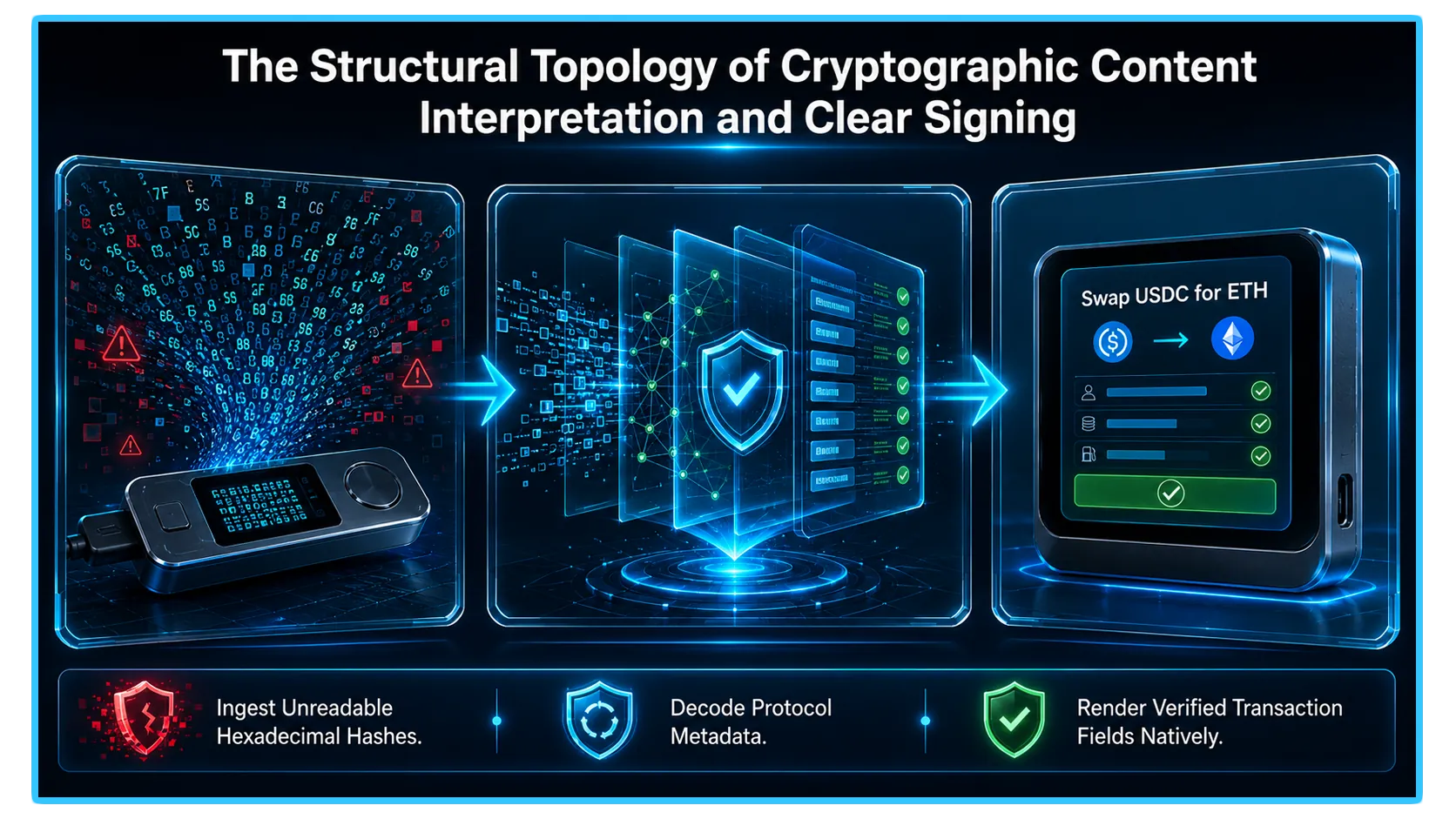
1. The Anatomy of a Blind Sign Event
- To protect your digital wealth, you have to understand exactly what happens under the hood during a blind signing event. When your software or hardware wallet cannot parse a dApp’s payload metadata, it cannot show you what the smart contract is actually going to execute. Instead, your screen will display a vague, non-descript message such as "Contract Interaction," "Data Present," or a raw cryptographic hash.
- By clicking "Sign," you are trusting the application interface implicitly. Scammers and state-sponsored hacking groups heavily exploit this presentation layer vulnerability through highly sophisticated phishing and social engineering campaigns.
- They alter the underlying code of a front-end interface, so while your computer screen says "Click here to claim airdrop," the hidden transaction payload you are authorizing is a malicious approval script or a "permit" message. The moment you authorize that blind hash, you grant the attacker permanent permission to siphon out your stablecoins or premium digital assets at a later date.
2. The Security Grid: Blind Signing vs. Clear Signing
To maintain a clean structural overview of how the digital asset landscape interprets transaction security, evaluate the core profiles organized inside this optimized layout:
| Signing Verification Profile | Core Operational Security Mechanism |
| Blind Signing Protocols | Forces users to authorize unreadable cryptographic hashes. |
| Clear Signing Standards | Decodes smart contract data into plain text directly on a trusted screen. |
3. Step-by-Step Playbook: Turning Off Blind Signing Safely
Step 1: Disable Blind Signing in Your Hardware Wallet Settings
- For maximum security, top-tier hardware signers disable blind signing by default. However, if you previously toggled it on to interact with an older or unoptimized dApp, you should immediately disable it.
- Open the specific network application (such as the Ethereum or EVM app) directly on your physical hardware device. Navigate into the Settings menu panel, locate the Blind Signing or Contract Data toggle configuration, and change the state to Disabled.
Step 2: Clean Up Your Open Token Approvals
- Turning off blind signing prevents future blind exploits, but it does not fix previous mistakes. If you previously blind-signed a malicious contract, the attacker might still hold open permissions to move your tokens.
- Navigate to a trusted on-chain permission manager such as Revoke.cash or the Token Approval Checker on your preferred block explorer. Connect your address layout, review every open allowance, and systematically revoke any unlimited or suspicious smart contract permissions associated with your high-value tokens.
Step 3: Mandate the ERC-7730 Clear Signing Standard
- The industry has aggressively transitioned to replace blind signing completely through the adoption of ERC-7730, an open-source clear signing standard backed by the Ethereum Foundation, Ledger, and other security teams.
- This standard requires smart contract developers to provide a plain-language translation schema for their protocols. Moving forward, make it a strict rule to only interact with wallets and dApps that support clear signing metadata, allowing you to visually confirm the exact asset amount, action type, and destination address on an independent, untampered display before hitting confirm.
4. High-Security Hygiene: Separating Vaults from Burners
Even as clear signing becomes the global industry standard, human error remains a critical vulnerability. To insulate your core digital wealth from sudden, fast-moving exploits or zero-day approval hacks, you must implement a strict architectural segregation strategy across your on-chain portfolio:
The Sovereign Storage Vault: Dedicate a highly secure, clean hardware wallet to act exclusively as your long-term storage vault. This address must never, under any circumstances, connect to a decentralized application, participate in an experimental NFT mint, or authorize a dApp transaction signature. It exists solely to receive and hold assets.
The High-Velocity Interaction Wallet: Utilize a completely separate software or hardware address with minimal capital allocations to serve as your active "burner" or interaction wallet. This is the only profile you use to connect to DeFi venues, swap tokens, or explore new protocols. If you accidentally blind-sign a malicious drainer payload here, your exposure is strictly limited to the small buffer balance inside the burner.
5. Real-Time Telemetry and Pre-Flight Diagnostics via DEXTools
Turning off blind signing and mandating clear-text verification protects your private keys from being weaponized against you. However, ensuring a transaction is safe requires looking beyond the display text on your device screen. A clear signing summary can accurately state that you are about to "Swap 500 USDC for Token X," but it cannot tell you if Token X contains a malicious honeypot tax or a hidden mint backdoor within its smart contract bytecode.
DEXTools provides the critical analytical data infrastructure needed to perform these diagnostic verifications in real-time before you ever prompt your wallet to sign. Before initiating a swap or approving a contract payload on any dApp, paste the target token's contract address straight into the advanced DEXTools Pair Explorer.
Reviewing live transaction feeds, verifying liquidity lock structures, and inspecting automated security audit parameters ensures that the project you are interacting with is legitimate, keeping your newly secured portfolio fully protected from rug pulls and market shocks.
You can access DEXTools here and start trading today!
Disclaimer: This article is for informational purposes only and does not constitute investment advice, financial advice, trading advice, or any other kind of advice. DEXTools does not recommend buying, selling, or holding any cryptocurrency or token. Users should conduct their own research and consult with a qualified financial advisor before making any investment decisions. Cryptocurrency investments are volatile and high-risk. DEXTools is not responsible for any losses incurred.