How to Send Crypto from Kraken to Phantom Wallet (2026)
— By Whatsertrade in Tutorials

Send crypto from Kraken to Phantom safely in 2026: pick the right network, run a test transfer, check fees, and fix stuck or missing withdrawals.
Sending crypto from Kraken to Phantom Wallet is a high-intent search because the user already owns the asset and now wants it inside a wallet built for actual on-chain use. The hard part is not the send button. The hard part is making sure the asset leaving Kraken is supported by Phantom on the chain you actually intend to use.
That matters because many users are really asking how to send crypto from Kraken to Phantom Wallet safely, not just how to click through a withdrawal screen. Phantom supports more than many beginners expect, but that does not mean every Kraken withdrawal path is automatically safe by default. You still need to match the asset, the chain, the destination address, and the wallet view before you hit confirm.
Quick answer
- Set up Phantom first and confirm the exact chain and asset you want to receive there.
- On Kraken, match the asset, receiving address, and network before confirming the withdrawal.
- If this is your first Kraken-to-Phantom transfer, use a small test transaction before moving the full amount.
Why Users Move Crypto from Kraken to Phantom
Kraken is where many users buy or hold assets. Phantom is where they want to actually use them in self-custody, especially when wallet-based activity matters more than exchange balances. So this route usually marks the transition from exchange convenience into wallet ownership.
If you need the wallet basics first, read our Phantom Wallet tutorial. If your real intent is specifically Solana transfer flow, our Coinbase to Phantom Solana guide is also useful as a chain-specific companion piece.
Kraken to Phantom checklist
Step 1: Prepare Phantom and Confirm the Destination Chain
Start inside Phantom, not inside Kraken. Open the relevant chain and asset context, then copy the correct receiving address from the wallet. This matters because the wallet should define the route. If you start with the exchange screen instead, it is much easier to treat the send as a generic action and miss a chain mismatch.
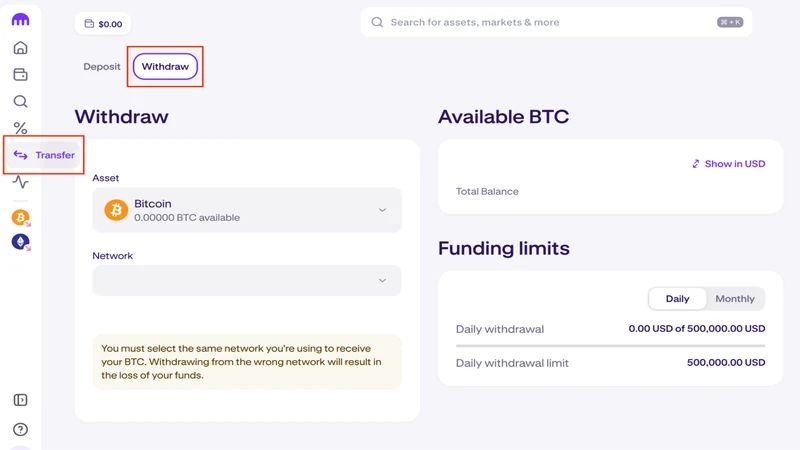
What to verify before sending to Phantom
Step 2: Configure the Kraken Withdrawal Slowly
Once Phantom is ready, go back to Kraken and configure the withdrawal field by field. This is not the moment to skim. Read the asset, address, network, and amount as one combined route. If Kraken offers several networks or routing options, that is the part that deserves the most attention.
Step 3: Use a Test Transaction for First-Time Routes
A test withdrawal is especially useful when the wallet supports multiple chains and you are still building intuition around what the receiving address actually represents. If the test transfer lands correctly in Phantom, you have much stronger evidence that the route is right before sending the rest.
Kraken to Phantom flow
Step 4: Verify the Asset in Phantom Before You Swap or Use It
After Kraken marks the withdrawal as complete, check Phantom before taking any next step. If the balance is not immediately visible, first verify the active chain and asset view. That catches many false alarms before they turn into panic.
Supported Chains, Fees, and Timing Matter More Than Users Expect
This route is trickier than a simple exchange-to-wallet send because Phantom can represent more than one chain environment. That is useful, but it also means the user has to be explicit about what kind of asset should arrive and where it should appear. A fast-looking Kraken withdrawal is not helpful if the destination assumption was fuzzy from the start.
Fees and timing also matter here. Kraken may quote one fee, but the real user experience includes route support, confirmation speed, and how easy it is to verify the asset once it lands in Phantom. A clean operational result beats a superficially cheap route every time. That is why the best version of this page needs to explain the judgment layer, not just the clicks.
What to confirm before sending from Kraken to Phantom
Common Kraken to Phantom Mistakes to Avoid
Mistakes that create avoidable confusion
What to Do If the Transfer Does Not Show Up in Phantom
If Kraken shows the withdrawal as complete and Phantom still looks empty, start by checking the active chain and token view in the wallet. Phantom can show different contexts, so users often look in the wrong place first. Then verify the Kraken transaction details and the destination address. If the on-chain record is correct, the issue is usually wallet visibility, token display, or chain context, not that the funds vanished.
This is also why the article should push a test send more aggressively than weaker competitors do. On a multi-chain wallet route, the first successful test removes most of the ambiguity before the real size moves.
Frequently Asked Questions
Can I send SOL from Kraken to Phantom?
Yes, as long as you use the correct Phantom receiving details and confirm the Kraken withdrawal fields carefully.
Can I send ETH or stablecoins from Kraken to Phantom?
Potentially yes, but you need to verify the supported chain and the exact route you are using. Do not assume every asset behaves like a Solana transfer.
What if the transfer does not appear in Phantom right away?
Check Kraken withdrawal status first, then confirm the active chain and token view in Phantom before assuming the transfer failed.
How much does it cost to send crypto from Kraken to Phantom Wallet?
The cost depends on the asset, the chain, and Kraken's live withdrawal fee. Check the exact route on the withdrawal screen because the cheapest-looking path is not always the cleanest wallet route.
Can I send any Kraken asset to Phantom Wallet?
No. You need to confirm that Phantom supports the specific asset and chain you plan to use. Do not assume every Kraken withdrawal path maps cleanly into Phantom.
Related reading
Disclaimer: This article is for educational purposes only and does not constitute investment, tax, or legal advice. Kraken withdrawal options and Phantom chain support can change over time. Always confirm the live destination chain, receiving address, and supported asset before moving funds.