How to Revoke Token Approvals (Wallet Security 2026)
— By Tony Rabbit in Tutorials
Learn how to revoke token approvals to secure your crypto wallet from exploits and unauthorized spending in 2026. A vital security habit.
Revoking token approvals is a critical wallet security practice that removes or reduces a smart contract's permission to spend specific tokens from your wallet. This action is performed on-chain using dedicated approval management dashboards or your wallet's built-in tools, requiring a gas fee. Regularly auditing and revoking stale, unused, or suspicious approvals protects your assets from potential exploits, malicious contract upgrades, or compromised decentralized application (dApp) frontends, especially when dealing with unlimited spending allowances.
Understanding Token Approvals: The Foundation of DeFi Interaction
A token approval is a permission you grant to a smart contract, allowing it to move a specified amount of a particular token from your wallet on your behalf. This mechanism is fundamental to how decentralized finance (DeFi) applications operate. When you swap tokens on a decentralized exchange (DEX), provide liquidity to a pool, or stake assets in a yield farming protocol, you'll typically be prompted to approve the protocol's smart contract to interact with your tokens. Without this approval, the contract cannot execute transactions involving your assets.
Why Token Approvals Become a Security Risk
While essential for functionality, token approvals introduce a significant security vector. The core problem arises when these permissions are granted indefinitely or to contracts that later become compromised. If a smart contract you've approved is exploited, suffers a critical bug, is maliciously upgraded, or its associated dApp frontend is compromised, the approval can be abused. An attacker could potentially drain tokens from your wallet without needing your explicit permission for each transaction, leveraging the pre-existing allowance.
The Danger of Unlimited Allowances
Many dApps, for the sake of user convenience, request 'unlimited' token approvals. This means the smart contract is authorized to spend any amount of that specific token from your wallet, up to your entire balance, without asking for further permission. While this streamlines repeat interactions (e.g., multiple swaps on the same DEX), it creates a substantial liability. An unlimited approval to a vulnerable contract is akin to giving someone a blank check to your bank account. If that contract is compromised, your entire balance of the approved token could be at risk.
When to Revoke Token Approvals Immediately
Proactive revocation is a cornerstone of robust wallet security. You should consider revoking approvals without delay in several critical scenarios:
- After using a new or experimental dApp: Especially those with limited audits or a nascent community.
- When a protocol has been hacked or exploited: Even if your funds weren't directly affected, the contract's integrity is compromised.
- When you no longer actively use a wallet: Dormant wallets with active approvals are prime targets for opportunistic attackers.
- When you approved a contract in a rush: If you didn't properly review the requested permissions, revoke and re-evaluate.
- If you notice any suspicious activity: Unusual transactions or wallet notifications should prompt an immediate review.
Step-by-Step Guide: How to Revoke Token Approvals
Revoking approvals is a straightforward process, though it requires an on-chain transaction and thus gas fees.
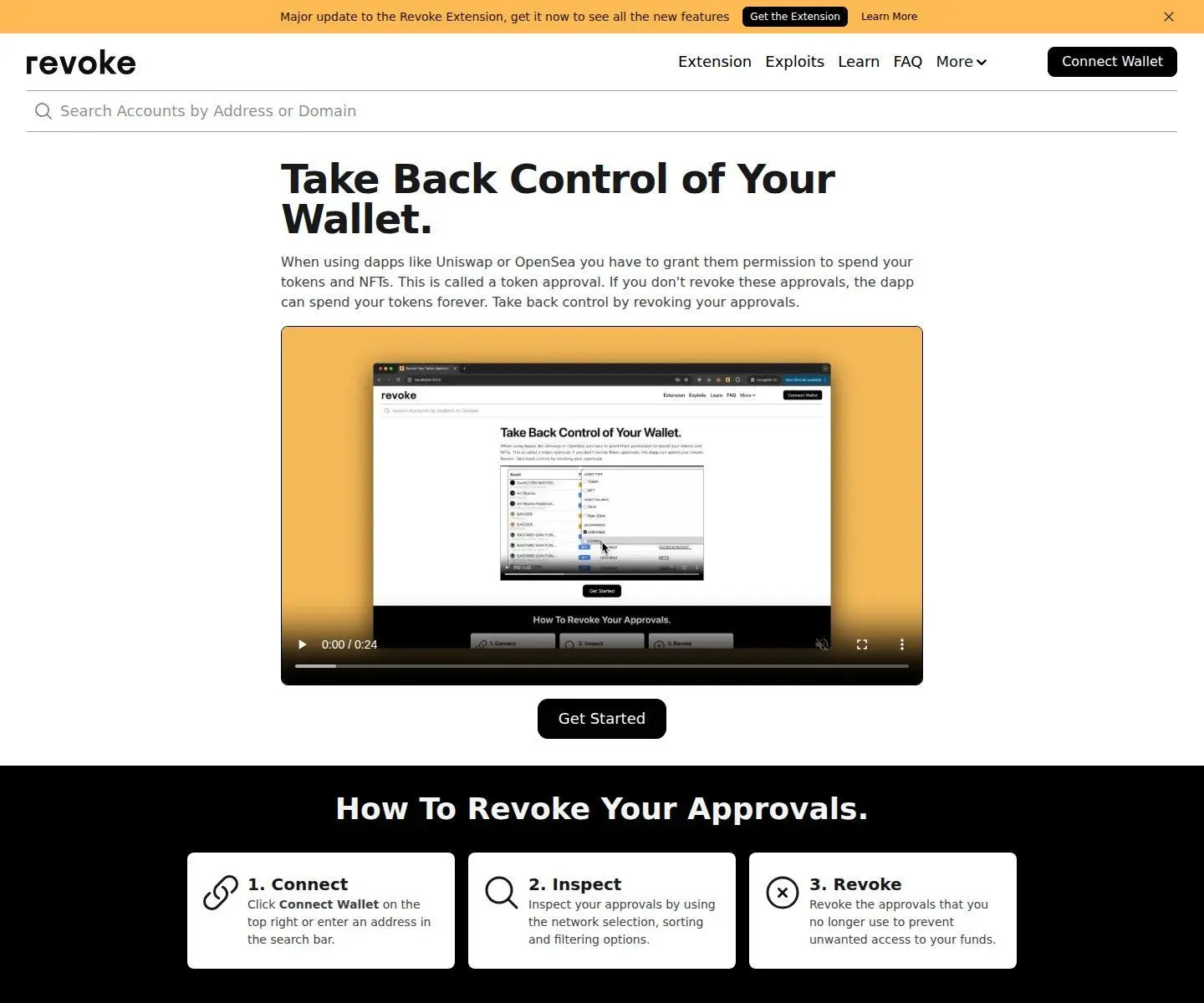
- Choose an Approval Dashboard. Open a reputable token approval management dashboard such as Revoke.cash, Etherscan's Token Approvals page, or your wallet's built-in approval manager (e.g., MetaMask's 'Approved Sites' or Ledger Live's DeFi dashboard).
- Connect Your Wallet. Connect the Web3 wallet you wish to audit to the chosen dashboard. Ensure you are connecting the correct wallet and that the dashboard is legitimate to avoid phishing scams.
- Select the Blockchain. Most dashboards support multiple chains. Select the specific blockchain (e.g., Ethereum, Polygon, BNB Chain, Arbitrum) on which you want to review approvals, as approvals are chain-specific.
- Review Approvals. The dashboard will display a list of all active token approvals for your connected wallet on the selected chain. Carefully review each entry, noting the token, the approved contract, and the approved amount (e.g., unlimited or a specific value).
- Identify Stale or Risky Approvals. Look for approvals to contracts you no longer use, those with unlimited allowances, or contracts associated with protocols that have been compromised or are no longer active.
- Revoke or Reduce. For approvals you wish to remove entirely, click the 'Revoke' button. Some tools also offer a 'Reduce' or 'Edit' option, allowing you to lower the spending limit instead of fully revoking. This can be useful for contracts you still use but want to limit exposure.
- Confirm the Transaction. Your wallet will prompt you to confirm the revocation transaction. Review the details, especially the gas fee. Remember that revoking is an on-chain action and incurs gas costs.
- Wait for On-Chain Settlement. Once confirmed, the transaction will be broadcast to the blockchain. Wait for it to be processed and confirmed by the network. The approval will then be removed or updated.
The Cost of Revocation: Why Gas Fees Matter
Yes, revoking an approval costs gas. Each revocation is an on-chain transaction that modifies the state of a smart contract (specifically, the allowance mapping). Like any other transaction on a blockchain, it requires network resources and therefore incurs a gas fee. The exact cost varies depending on network congestion and the complexity of the specific token's contract. While some users delay revocation due to gas costs, for wallets holding significant balances or those with numerous old approvals, the security benefit almost always outweighs the transaction fee.
Approval Types: Convenience vs. Risk
Best Wallet Security Habits for Active DeFi Users (2026)
For those deeply engaged in DeFi, a layered security approach is paramount:
- Wallet Segmentation: Do not use a single wallet for all activities. Designate separate wallets: one for long-term cold storage (minimal interaction), one for active DeFi participation (regularly audited approvals), and potentially a 'burner' wallet for higher-risk experiments with minimal funds.
- Regular Audits: Make reviewing and revoking token approvals a routine habit, perhaps weekly or monthly, depending on your activity level.
- Hardware Wallets: Always use a hardware wallet (like Ledger or Trezor) for signing transactions, especially for your active DeFi wallet. This adds an extra layer of physical security.
- Limit Exposure: Keep the amount of funds in your active DeFi wallet to what you are comfortable potentially losing, and only transfer more as needed.
- Stay Informed: Follow security alerts from reputable sources, dApp communities, and blockchain security firms.
How DEXTools Helps You Stay Secure
While DEXTools primarily focuses on real-time market data and trading insights, understanding market dynamics is intrinsically linked to secure DeFi participation. By providing comprehensive token information, liquidity data, and scam detection features (like our honeypot checker), DEXTools empowers users to make more informed decisions about which tokens and protocols to interact with. A well-researched investment decision, aided by tools like DEXTools, reduces the likelihood of interacting with malicious contracts in the first place, thereby minimizing the need for emergency revocations.
Helpful Next Reads on DEXTools
- What Is a Crypto Approval Transaction? Complete Beginner Guide (2026)
- What Is a Smart Contract? Complete Beginner Guide (2026)
- How to Check if a Token Is a Honeypot with DEXTools (2026)
More Guides on This Topic
- How to Use Ledger Hardware Wallet: Complete Security Tutorial (2026)
- DeBank Tutorial: Mastering Your DeFi Portfolio (2026)
- Zapper Guide: Comprehensive DeFi Asset Management (2026)
Frequently Asked Questions
What happens when I revoke a token approval?
You remove or reduce a smart contract's permission to spend a specific token from your wallet. This action is recorded on the blockchain, making the previous allowance invalid or limited.
Do I need to revoke every approval?
Not necessarily, but you should review them regularly. Prioritize revoking unlimited approvals, those to unused or suspicious contracts, and approvals to protocols that have been compromised.
Is revoking approvals safe?
Yes, revoking approvals is a fundamental security measure. It reduces your wallet's exposure to potential exploits of smart contracts you've previously interacted with.
Can I revoke approvals on any blockchain?
Yes, token approvals are blockchain-specific. You can revoke approvals on any EVM-compatible chain (Ethereum, Polygon, BNB Chain, Arbitrum, etc.) using appropriate tools for that chain.
What if I revoke an approval for a dApp I still use?
If you revoke an approval for a dApp you still use, you will simply be prompted to approve the contract again the next time you interact with it. You can then choose to grant a limited or unlimited approval based on your risk tolerance.
Are there free ways to revoke token approvals?
While the tools to manage approvals are often free to use, the actual revocation transaction always incurs a gas fee, which is paid to the network validators, not the tool provider.
How often should I check my token approvals?
The frequency depends on your DeFi activity. Active users should check weekly or bi-weekly. Less active users might check monthly or quarterly. Always check after interacting with new or experimental dApps.
Can a revoked approval be reinstated by a scammer?
No. Once an approval is revoked on-chain, it cannot be reinstated by anyone without your explicit signature for a new approval transaction from your wallet. The revocation is permanent.
What is the difference between revoking and reducing an approval?
Revoking an approval completely removes the smart contract's permission to spend a token. Reducing an approval lowers the maximum amount of tokens the contract is allowed to spend, rather than eliminating the permission entirely.